Source code: github.com/abiddotdev/awesome_ai/…/pi_generative_ui
In an earlier article, I dug deep into Claude’s visualizer: the system that turns “draw me a bar chart” into a live streamed visual. This is the implementation: a Node server, an agent loop, two custom tools, and a browser frontend rendering agent-generated SVG/HTML inside sandboxed iframes. The pattern works with any agent SDK (Pi here), but the architecture holds. A reference you can run locally and adapt.
Table of Contents
Open Table of Contents
What We’re Building
A local web app where you type a prompt and the agent renders visuals inline (bar charts, flowcharts, mockups, interactive dashboards), all streaming in live as the model generates the code.
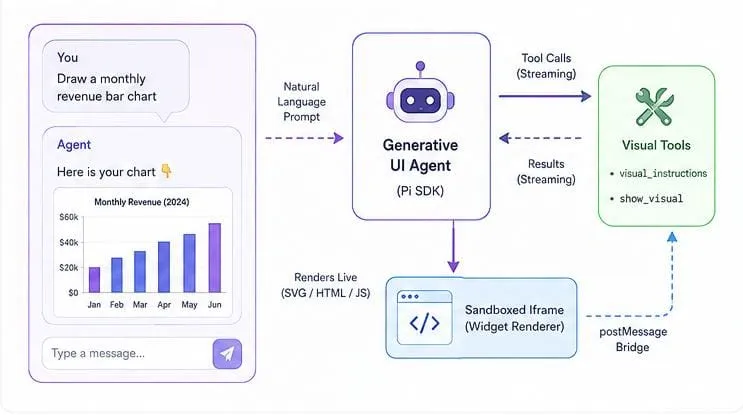
The user types “monthly revenue bar chart”. The agent calls visual_instructions to load the design spec, then show_visual with the SVG. As the tool-call arguments stream in, the browser paints the chart token by token. When the call completes, the final SVG is saved to disk and the preview swaps to the persisted file.
The Three Pieces
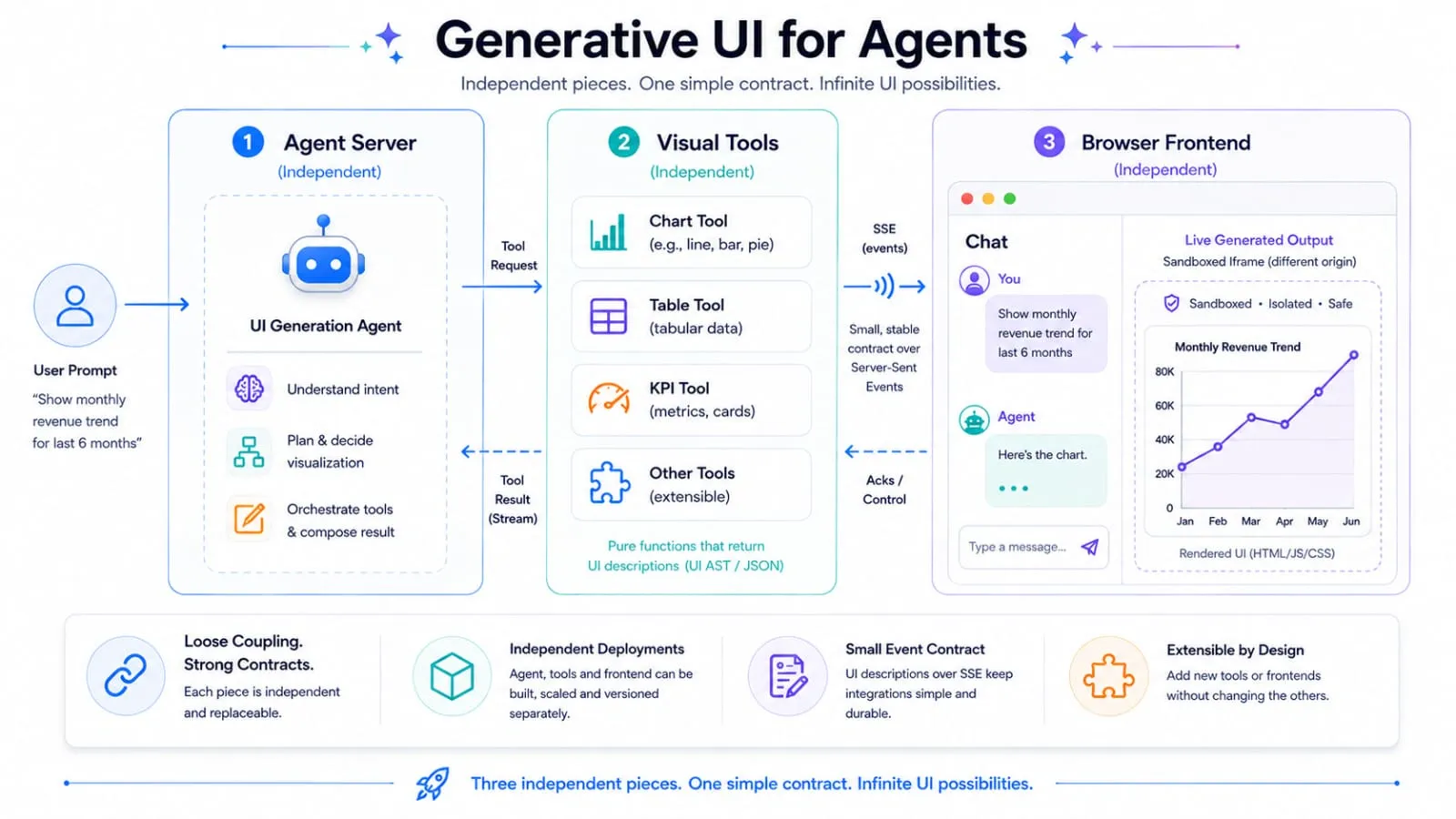
Before the code, the architecture. Three independent pieces, and keeping them separate is the constraint:
- The agent server: bridges HTTP/SSE to the Pi agent loop.
- The visual tools: a Pi extension that registers
visual_instructionsandshow_visual. - The frontend: a chat UI plus a widget manager that renders tool output in sandboxed iframes.
Each piece is isolated. The agent server doesn’t know about visuals. The tools don’t know about the browser. The frontend doesn’t know how the agent works internally.
The only contract between them is the SSE event stream. Swap any piece (agent, tools, frontend) as long as the events stay the same, nothing else breaks. The MCP Apps spec standardizes a version of this three-piece split for MCP hosts.
The full event flow:
Piece 1: The Agent Server
Setting Up the Agent Runtime
The Pi SDK gives us the agent loop: it calls the LLM, parses tool calls, executes tools, and emits events. ModelRuntime manages provider configuration and API keys. We declare any OpenAI-compatible API as a custom provider with a full model manifest, then register it on the runtime:
const AGENT_DIR = join(__dirname, ".pi");
const PROVIDER_ID = "native-local";
const modelRuntime = await ModelRuntime.create({ agentDir: AGENT_DIR });
modelRuntime.setRuntimeApiKey(PROVIDER_ID, API_KEY);

const providerConfig = {
  name: "Native Local",
  baseUrl: API_BASE,
  apiKey: "$OPENAI_API_KEY",
  api: "openai-completions",
  models: [{ id: MODEL_ID, name: MODEL_ID, reasoning: false, input: ["text", "image"], contextWindow: 128000, maxTokens: 8192 }],
};
modelRuntime.registerProvider(PROVIDER_ID, providerConfig);
The System Prompt
The system prompt teaches the model the contract of your tools:
const SYSTEM_PROMPT = `You are a generative UI agent. You have two tools:
- visual_instructions: Call this first to get theme variables and authoring rules.
- show_visual: Call this with SVG or HTML code to render a widget in the browser.

When the user asks you to visualize:
1. Call visual_instructions to get the theme and rules
2. Then call show_visual directly with the complete widget code.
3. After calling show_visual, write a brief description.

IMPORTANT: Do NOT output raw SVG/HTML code as text. Only use show_visual tool to display widgets.
Keep widget code self-contained. Use CSS variables from the theme.`;
The critical instruction is “Do NOT output raw SVG/HTML code as text.” Without it, the model dumps a bar chart as a code block, which the browser can’t render. The streaming-preview architecture depends on code arriving inside the tool call, not as prose.
Piece 2: The Visual Tools
The Pi SDK’s tool system: you call defineTool() with a name, parameters schema, and an execute function. The agent loop calls it when the LLM requests it. Ours registers two tools: a “load instructions” tool and a “render” tool, mirroring Claude’s visualizer:read_me and visualizer:show_widget.
visual_instructions - The JIT Knowledge Injection
This is the module-loading pattern from the architecture article. Design constraints aren’t in the model’s training data: exact theme variables, animation rules, streaming-friendly authoring patterns. So we load them fresh before every render:
A dynamic tool call is one way to deliver this. If you’re exposing the agent as a remote MCP server, a skill works just as well: the client requests it once and the instructions come back as static content, no tool round-trip needed. Use a tool when the guidance varies by input (modules, platform); use a skill when it doesn’t.
const visualInstructionsTool = defineTool({
  name: "visual_instructions",
  parameters: Type.Object({ modules: Type.Optional(Type.Array(Type.String())), platform: Type.Optional(Type.String()) }),
  async execute(_toolCallId, params) {
    const modules = params.modules ?? ["diagram", "interactive"];
    const platform = params.platform ?? "unknown";
    // ... builds and returns the spec with theme, viewport, and rules
  },
});
Seven modules: diagram, mockup, interactive, data_viz, art, chart, elicitation. Each carries module-specific guidance. The returned spec includes the theme (CSS variables with fallbacks), viewport dimensions, and a rules array: the actionable constraints:
rules: [
  "Return raw SVG starting with <svg, or raw HTML without html/head/body tags.",
  "Order code for streaming: <style> first, visible SVG/HTML next, <script> last.",
  "Prefer inline styles over <style> blocks (they apply mid-stream).",
  "Avoid gradients and shadows: they flicker while content streams in.",
  "ANIMATION RULE: The ONLY properties you may animate are transform, opacity, and stroke-dashoffset.",
  "FORBIDDEN animated properties: width, height, x, y, cx, cy, r, fill, stroke, background-color, etc.",
  "Wrap all animation/transition declarations in @media (prefers-reduced-motion: no-preference) { }.",
  "Use window.storage with namespaced keys like 'table:record_id'. get() throws on missing keys.",
],
The animation rules are explicit because each forbidden property triggers layout recalculation or repaint across the iframe boundary during streaming. These rules are the difference between a widget that streams in cleanly and one that flickers into a repaint storm.
show_visual - The Render Tool
The second tool takes the code and persists it. Title must be snake_case (^[a-z][a-z0-9_]{2,80}$); it doubles as the filename. Mode detection is an 80-character sniff: does the code start with <svg? That drives everything downstream.
const showVisualTool = defineTool({
  name: "show_visual",
  parameters: Type.Object({ title: Type.String(), widget_code: Type.String(), loading_messages: Type.Array(Type.String()) }),
  async execute(_toolCallId, params) {
    const { title, widget_code } = params;
    if (!TITLE_RE.test(title)) return { isError: true, ... };
    const mode = widget_code.trimStart().slice(0, 80).toLowerCase().startsWith("<svg") ? "svg" : "html";
    // Validate HTML doesn't include DOCTYPE/html/head/body
    // Save to exports/<title>.<ext>
    return { title, mode, filename, filepath: 'exports/<title>.<ext>', ... };
  },
});
The saved HTML file is a complete standalone document with theme tokens, a <section class="widget"> wrapper, and the raw widget code inside. This mirrors the mandatory load rule from the architecture article, but here it’s convention, not enforcement. The system prompt tells the model to call visual_instructions first, but show_visual doesn’t check. Skip it and the widget still renders, just without fresh theme/authoring context.
Piece 3: The Frontend
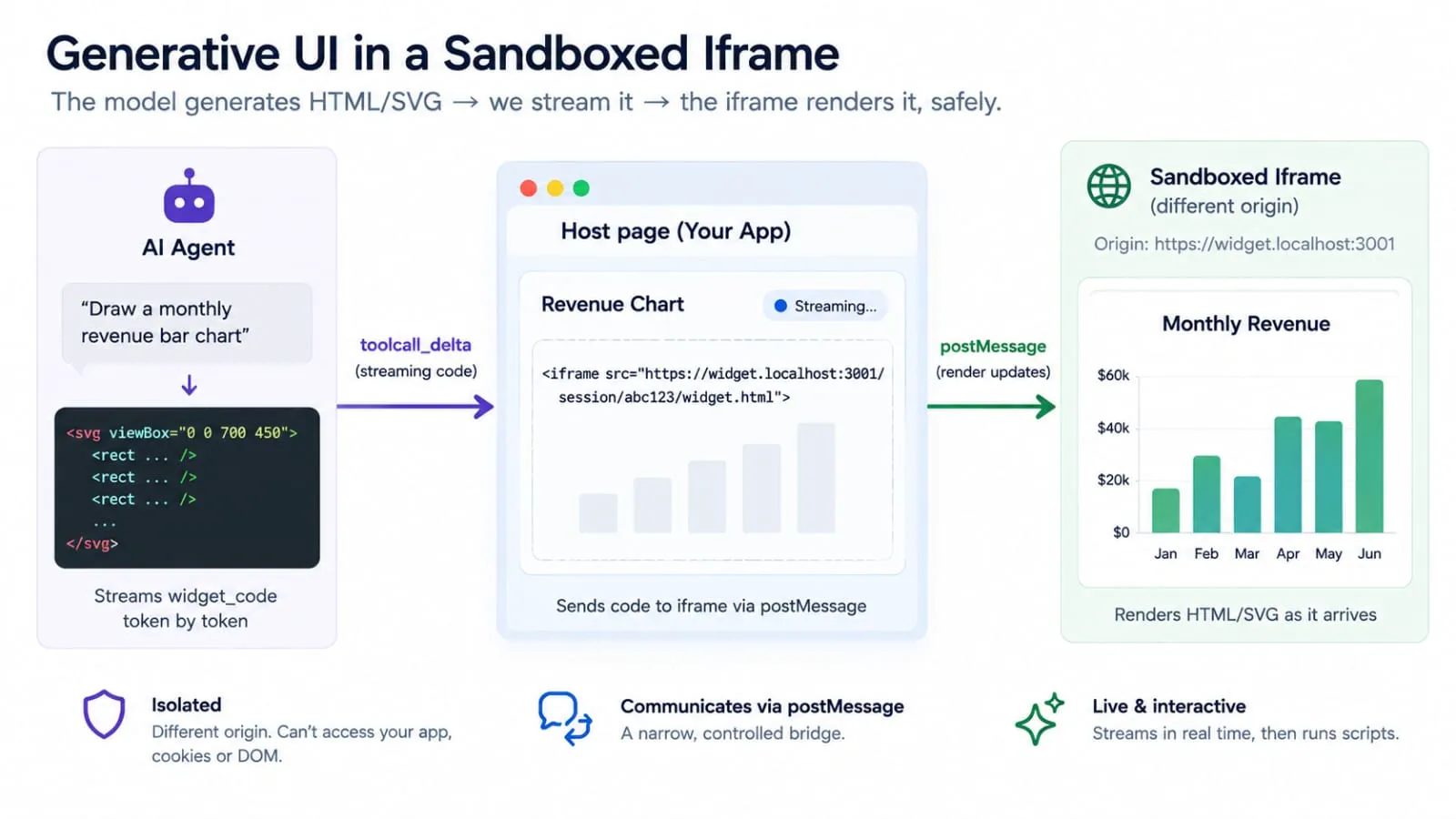
The browser side is where the architecture article’s patterns become concrete. Two files: app.js (the chat controller) and widgets.js (the renderer).
SSE: The Conversation Backbone
The browser opens one persistent connection to /api/events. The server pushes named events down it:
function connectSSE() {
  if (evtSource) evtSource.close();
  evtSource = new EventSource("/api/events");

  evtSource.addEventListener("text_delta", (e) => {
    const { delta } = JSON.parse(e.data);
    if (!currentAssistantDiv) currentAssistantDiv = addMessageEl("assistant", "");
    currentText += delta;
    currentAssistantDiv.textContent = currentText;
  });

  evtSource.addEventListener("widget_stream_delta", (e) => {
    const { code } = JSON.parse(e.data);
    const top = widgetStack[widgetStack.length - 1];
    if (top && typeof code === "string") {
      top.widget.update(code);  // ← live preview, token by token
    }
  });
}
Notice currentAssistantDiv.textContent = currentText: we use textContent, not innerHTML, so streamed text is never parsed as markup. Also, the widgetStack is a stack, not a single reference. Multiple widgets can stream concurrently (the agent can call show_visual twice in one turn), and the stack ensures each widget_stream_delta reaches the right widget.
The key mechanism is widget_stream_delta. What’s happening is the LLM streaming the arguments of the show_visual call before the call completes. Three separate streams are stacked here: model → tool arguments, server → SSE, widget manager → iframe markup. On the server:
} else if (ae.type === "toolcall_delta") {
  // The tool-call argument JSON is growing. Pi parses it incrementally,
  // so arguments.widget_code is already a clean string at every tick.
  const tc = event.message?.content?.[ae.contentIndex];
  if (tc?.type === "toolCall" && tc.name === "show_visual") {
    const code = tc.arguments?.widget_code;
    if (typeof code === "string") broadcast("widget_stream_delta", { code });
  }
}
Pi’s reducer parses streaming JSON incrementally, so even though the model is emitting {"title":"...","widget_code":"<svg>..."} character by character, we get the current value of widget_code at every tick. We forward that full value (not a delta to append) and the browser re-renders. The MCP Apps spec calls this ui/notifications/tool-input-partial: streaming tool arguments to the iframe before the call completes. Same idea, formalized.
The server translates tool execution lifecycle events into tool_start / tool_end SSE events. The browser shows collapsible cards with a timer measuring just execution (the save). The widget preview tracks a separate timer from widget_stream_start, reflecting the full render: streaming plus save.
This is the streaming constraint from the architecture article, made operational. The SVG builds up live in the chat, the way Claude’s diagrams do.
The Widget Manager
widgets.js owns everything about rendering. A WidgetPreview instance drives one widget through its lifecycle:
startPreview()     widget_stream_start event
       ↓
update(code)       widget_stream_delta (throttled, live preview)
       ↓
commit(code)       widget_stream_end (final render + run-scripts)
       ↓
finalize()         tool_end (swap live preview → saved file)
       ↓
abort()            turn ended without finalize (partial content)
If the agent errors or the stream is interrupted, abort() keeps partial renders visible but stops the “BUILDING…” pulse. Empty cards are removed entirely.
The Sandboxed Iframe
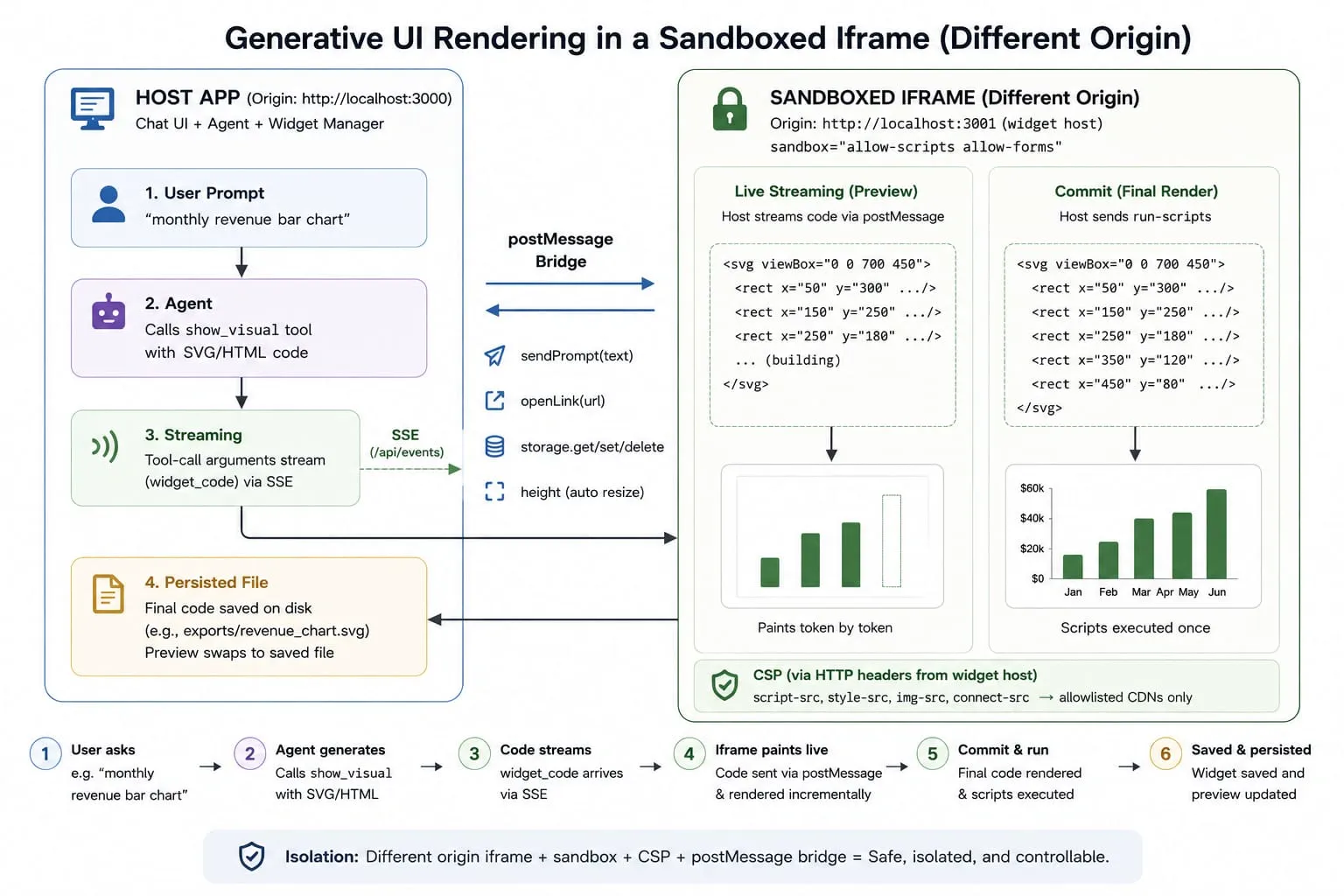
Every widget renders inside a sandboxed iframe. This is the security model from the architecture article, and it’s non-negotiable. Widget code is model-generated; you cannot trust it.
const iframe = document.createElement("iframe");
iframe.setAttribute("sandbox", "allow-scripts allow-forms");
iframe.setAttribute("allow", "fullscreen *");
Only grant allow permissions the bridge actually uses. clipboard-write looked harmless at first, but nothing in the bridge exposes a copy function, so it was just an ungated way for any click in a widget to overwrite the host clipboard. Dropped it. fullscreen stays because it’s visible, reversible with Escape, and plausible for chart/dashboard widgets.
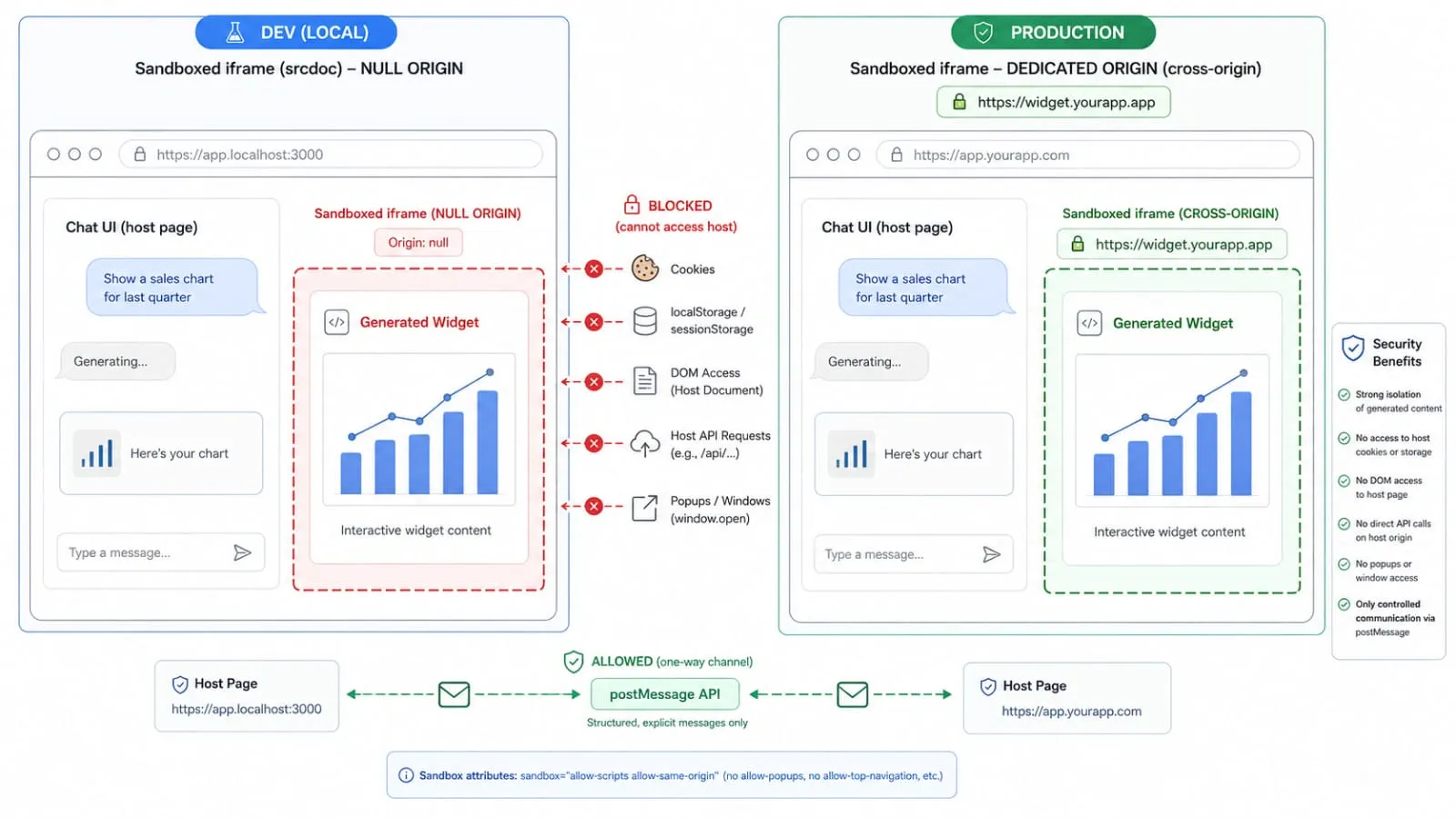
What’s missing from sandbox matters more: allow-same-origin. Without it, the iframe gets a null origin. Because the sandboxed iframe has an opaque (null) origin, it can’t use the host’s origin to access host resources:
- Cannot read the host page’s cookies or localStorage (origin mismatch)
- Cannot touch the host DOM, no reading
#input, no manipulating#chat - Cannot call host endpoints like
/api/chat(cross-origin fetch blocked) - Cannot open popups (no
allow-popups)
It can run scripts (allow-scripts) and submit forms (allow-forms). All host communication happens through postMessage, via injected globals.
This null-origin trick is a dev-mode shortcut: it gets you real isolation from a single srcdoc string, with no second domain to provision. It has a real cost though. The isolation lives entirely inside the sandbox attribute, which is one typo away from disappearing. Claude’s actual production setup takes the more standard and more robust path: it serves widget content from a genuinely separate origin (a session-scoped subdomain) and points the iframe’s src at that URL instead of using srcdoc. The browser then enforces a real cross-origin boundary on its own; the sandbox attribute becomes defense in depth rather than the whole boundary, and CSP arrives as real HTTP headers instead of a meta tag. Pointing the live iframe at that origin directly is the next step toward production.
CSP From a Meta Tag
Claude serves its iframes from a parametric page server that bakes CSP into HTTP headers. We use srcdoc (inline document) instead, so CSP travels as a <meta> tag inside the document:
const CDN_LIST = [
  "https://esm.sh",
  "https://cdnjs.cloudflare.com",
  "https://cdn.jsdelivr.net",
  "https://unpkg.com",
].join(" ");

const CSP_DIRECTIVES = [
  "default-src 'unsafe-inline' data:",
  `script-src 'unsafe-inline' ${CDN_LIST}`,
  `style-src 'unsafe-inline' ${CDN_LIST}`,
  `img-src 'self' data: ${CDN_LIST}`,
  `font-src ${CDN_LIST}`,
  `connect-src ${CDN_LIST}`,
  "form-action 'none'",
  "base-uri 'none'",
  "object-src 'none'",
].join("; ");
Widgets talk back to the host over postMessage, never by navigating, so form-action 'none' and base-uri 'none' close off form submission and <base>-tag redirects with no loss of functionality. object-src 'none' closes the door on <object>/<embed>/<applet> too: legacy plugin tags no widget has a reason to use.
allow-forms stays in the sandbox attribute so widgets can still use native <form>/<input> elements for validation and Enter-to-submit UX, but form-action 'none' is the actual backstop: even if a widget tries to submit, CSP blocks the navigation, so the sandbox permission can’t be used to exfiltrate data.
The same four-CDN allowlist: scripts from any other domain are silently blocked, the browser enforces it, and the widget can’t escape it.
'unsafe-inline' is intentional. The widget code is inline script. CSP and the sandbox play different roles here: the sandbox keeps the widget from acquiring the host’s origin, so it can’t touch host cookies, storage, or DOM directly; CSP restricts which external domains the widget’s own script can reach. Neither is an XSS filter, arbitrary widget JS still runs, it’s just fenced in.
The Widget Host Server
A second server on port 3001 (widget-host.js) serves saved widget files cross-origin. It checks filenames for path traversal, validates the Host header, and only echoes CORS back to the app’s own origin. The browser learns this origin from a /api/config endpoint fetched once on load.
The postMessage Bridge
A null-origin iframe can’t call the host directly. So we inject four capabilities (sendPrompt, openLink, window.storage, and a render pipeline) that communicate via postMessage. This is the injected globals pattern, a stable API that hides the host’s implementation. The MCP Apps spec defines the same bridge contract for its UI layer.
The Widget Side
A script injected into every iframe defines the globals. All of them funnel through one postMessage call with a namespace tag:
┌─────────────────────────────────────────────────────────┐
│  iframe (null origin)                                    │
│                                                          │
│  sendPrompt() ──┐                                        │
│  openLink()   ──┼── postMessage({ __bridge: "widget-bridge" })
│  storage.*    ──┘                                        │
│                                                          │
│  ◄── render (set innerHTML)                              │
│  ◄── run-scripts (clone <script> tags)                   │
│  ◄── storage-response (KV values)                        │
└─────────────────────────────────────────────────────────┘
                          │
                          ▼
┌─────────────────────────────────────────────────────────┐
│  Host (WidgetPreview)                                    │
│  Routes by type, handles height/sendPrompt/openLink      │
└─────────────────────────────────────────────────────────┘
The "*" target origin is required here: a null-origin frame has no origin to match against. The namespace (__bridge: "widget-bridge") is how the host filters out the noise of other postMessages flying around.
The bridge script also listens for incoming messages from the host, specifically render (set #viewport.innerHTML), run-scripts (clone and re-execute <script> tags), and storage-response (return values from KV operations). This bidirectional channel is what makes the hybrid streaming strategy work (more below).
The Host Side
The host listens and routes by type:
_onMessage(e) {
  if (e.source !== this.iframe.contentWindow) return;  // only our frame
  const d = e.data;
  if (!d || d.__bridge !== "widget-bridge") return;    // only our namespace
  const { type, payload } = d;

  if (type === "height" && typeof payload.height === "number") {
    // Clamp: a broken or hostile widget cannot inflate page layout by
    // self-reporting a huge height.
    const height = Math.max(0, Math.min(payload.height, MAX_WIDGET_HEIGHT));
    this.iframe.style.height = height + "px";
    this.wrapper.style.height = height + "px";
  } else if (type === "sendPrompt") {
    handleWidgetPrompt(payload.text);  // new agent turn
  } else if (type === "openLink") {
    // http(s) only, blocks javascript:, data:, file:, and custom schemes.
    const u = String(payload.url || "");
    if (/^https?:\/\//i.test(u)) window.open(u, "_blank", "noopener,noreferrer");
  } else if (type === "storage-get" || type === "storage-set" || type === "storage-delete") {
    // handle and respond (see below)
  }
}
e.source !== this.iframe.contentWindow is the real identity check, browser-enforced and unforgeable, critical when multiple widgets are alive. The namespace tag isn’t authentication; it just filters out unrelated postMessages that happen to hit the same listener.
When the widget calls sendPrompt("explain the spike at 14:00"), the host appends a message bubble and fires a new agent turn, tagged via widget in the UI and prefixed [widget] for the model. Both sendPrompt and openLink require event.isTrusted before forwarding, a real click or keypress, not a <script> firing on load or a timer. That’s an abuse-reduction heuristic, not a security boundary, widget code is LLM-generated, so treat it as a speed bump, not a guarantee.
The Storage Protocol
window.storage is request/response, not fire-and-forget. Each request gets a unique ID, the widget tracks a pending Map of promises, and the host posts back a response with the same ID. Three patterns worth stealing: the 10-second timeout, the unique ID matching, and the convention that get() throws on a missing key. Our storage is an in-memory Map, keys namespaced by widget title so different widgets can’t collide while the same widget regenerated later still sees its own state; Claude’s is server-side. The protocol is identical.
Streaming: Painting SVG Token by Token
As the model generates <svg viewBox="0 0 700 450"><rect .../>, the browser paints each element as it arrives. The chart builds up live.
The Hybrid Strategy: Shell Once, Body via postMessage
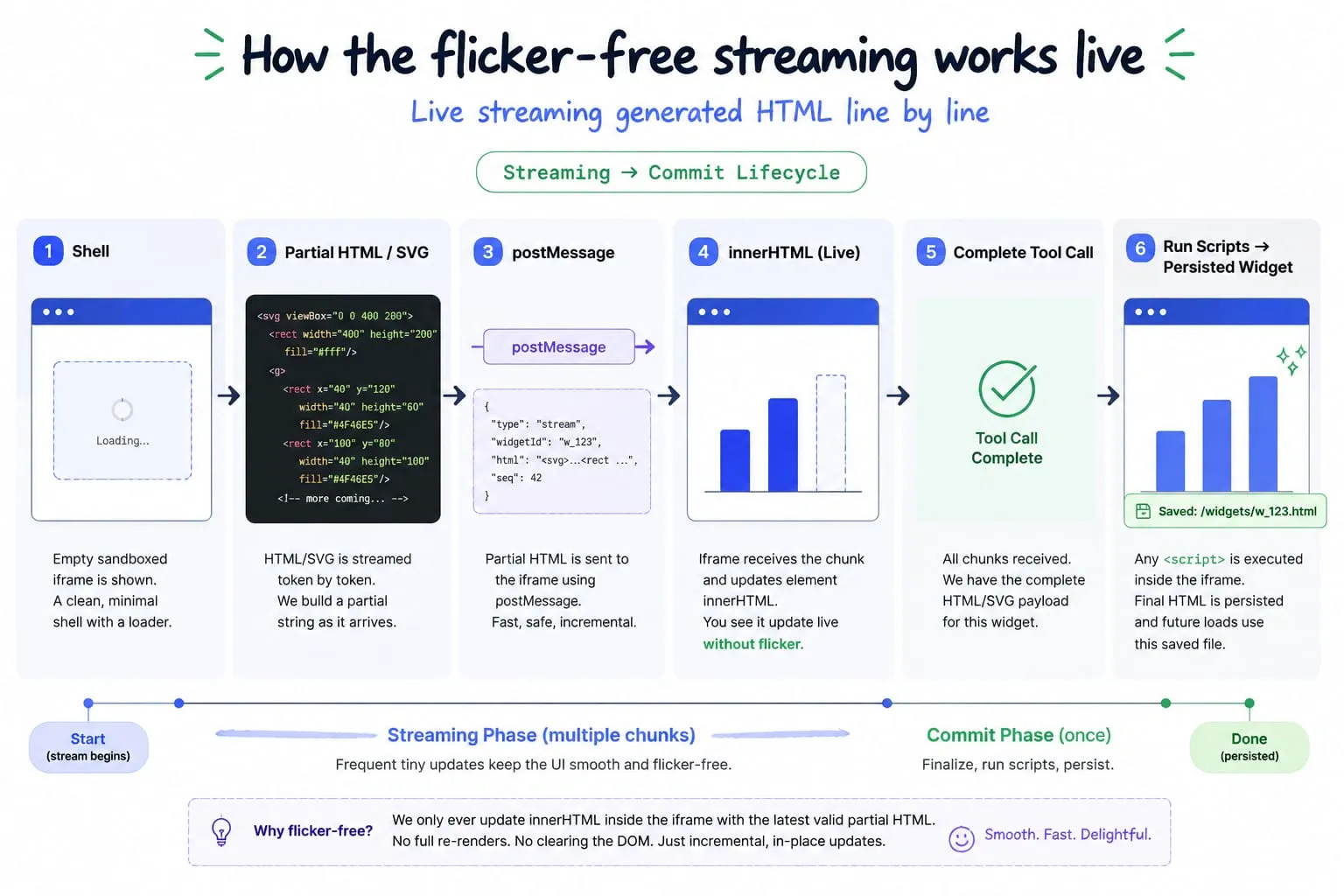
The initial version rewrote the iframe’s srcdoc on every tick, reloading the entire document and re-running scripts each time. The first version was unwatchable. Every 50ms the whole chart vanished and reappeared from scratch, CSS animations restarting mid-transition, layout jumping as scripts tried to execute against a half-finished DOM. Streaming HTML was messier than I expected: partial tags, scripts trying to execute against incomplete DOM, layout thrashing. Took a few attempts to land on the hybrid approach:
-
Shell (once): When the card is created,
srcdocis written once with CSP, theme tokens, the bridge script, and an empty#viewport. The document never reloads. -
Streaming (body via postMessage): During streaming, the host
postMessages the latest partial code into the iframe. The bridge script receives it and sets#viewport.innerHTML. SinceinnerHTMLdoesn’t execute inserted<script>tags, streaming partials skip that one behavior, though the sandbox and CSP are still what keep the frame safe overall, so streaming stays cheap and flicker-free. Rapid deltas are throttled to one write per 50ms viarequestAnimationFrame. -
Commit (run-scripts): When the tool call completes, the host sends a final
rendermessage followed by arun-scriptsmessage. The bridge clones all<script>nodes in#viewportand replaces them, the standard trick to make inertinnerHTMLscripts actually run. Scripts execute exactly once against the complete DOM.
// Host side (WidgetPreview)
_renderBody(code, mode) {
  const html = this._wrap(code, mode);
  this._postOrBuffer({ __bridge: "widget-bridge", type: "render", payload: html });
}
_runScripts() {
  this._postOrBuffer({ __bridge: "widget-bridge", type: "run-scripts" });
}

// Widget side (bridge script)
function setBody(html) {
  var vp = document.getElementById("viewport");
  vp.innerHTML = html;  // safe: innerHTML doesn't run <script> tags
}
function runScripts() {
  var vp = document.getElementById("viewport");
  var scripts = vp.querySelectorAll("script");
  scripts.forEach(function (old) {
    var s = document.createElement("script");
    for (var i = 0; i < old.attributes.length; i++) {
      s.setAttribute(old.attributes[i].name, old.attributes[i].value);
    }
    s.textContent = old.textContent;
    old.parentNode.replaceChild(s, old);
  });
}
This removes the per-tick document reload that the old approach suffered from, while keeping the null-origin isolation intact. Messages sent before the shell finishes loading are buffered in _pendingMsgs and flushed on the iframe’s load event.
Streaming Optimizations
Two problems show up when you stream SVG token by token.
Animation flicker was bad. Each innerHTML update destroys and recreates DOM nodes, restarting CSS animations from scratch. SVGs with transforms were especially ugly, elements popping in and out of position on every tick. The fix is a .frozen class applied during streaming that suppresses all animations:
.frozen, .frozen *, .frozen *::before, .frozen *::after {
  animation: none !important;
  transition: none !important;
}
Height measurement is trickier. A null-origin iframe can’t be measured from outside. The iframe must report its own height via postMessage. We use ResizeObserver + MutationObserver with a 60ms debounce. Each widget produces two sibling divs: a placeholder that reserves layout space and a wrapper that holds the iframe. When height arrives, the host resizes both and scrolls to keep the widget visible. Placeholder holds the space, wrapper animates, iframe fills.
Failure handling here is minimal by design: a turn that errors or never calls show_visual still ends with agent_end, which the widget stack uses to abort() any partial render; a dropped SSE connection just relies on the browser’s default EventSource retry, no custom reconnect logic.
Design Tradeoffs: Dev vs. Production
Every shortcut in this implementation was made to keep it a single process you can run on a laptop. None are architectural requirements, and most map directly onto how Claude’s own production setup handles the same problem. What to change for production:
| Concern | This implementation (dev) | Recommended for production |
|---|---|---|
| Iframe origin | Null origin via srcdoc (no allow-same-origin) | Dedicated subdomain, iframe.src points at it directly |
| CSP delivery | <meta> tag inside srcdoc | Real HTTP response headers from the widget origin |
| Storage | In-memory Map, keyed by widget title | Server-side, keyed by userId + conversationId |
| Chat/agent access | Loopback bind, Host header check, no * CORS | Same principle, extended to your real domain and auth layer |
| Scale | Single process, one shared in-memory session | Per-user sessions, horizontal scaling, persistence |
Running It
Clone the repo and start the servers:
git clone https://github.com/abiddotdev/awesome_ai.git
cd awesome_ai/agents/pi_generative_ui
npm install
cp .env.example .env   # add your OpenAI-compatible API key
npm start
Open http://localhost:3000 and try “monthly revenue bar chart”. Any OpenAI-compatible endpoint works, whether that’s OpenRouter, Ollama, or a local LLM. Two servers run: port 3000 (frontend + agent + SSE) and port 3001 (widget host for saved files, scoped to the app’s own origin).
Closing Thoughts
Each piece does one thing. The contract between them is small. The security boundary is the iframe, drawn once at the edge, assumed to be nothing other than what it is. The UI layer of the MCP Apps spec describes the same pattern. Iframe isolation, postMessage bridges, tool-driven rendering. It works.