A Skill Store in a Slash Command
Say a colleague shares a skill and you install it. Next week they rewrite it, or delete it. What happens to yours? That question, and a few like it, shaped most of this build.
In May I added a community skills marketplace to Nimbus, a product I work on. Our own teams and the product’s users all share one catalog. Anyone can share a skill they made, browse and rate skills other people shared, install one with a keypress, and uninstall or unshare from the same place.
It replaced passing zip files around by email. The marketplace lives in the slash command panel that was already there, as a second command next to /skills. No new modal, no new page. Type /community, pick one, press Enter.
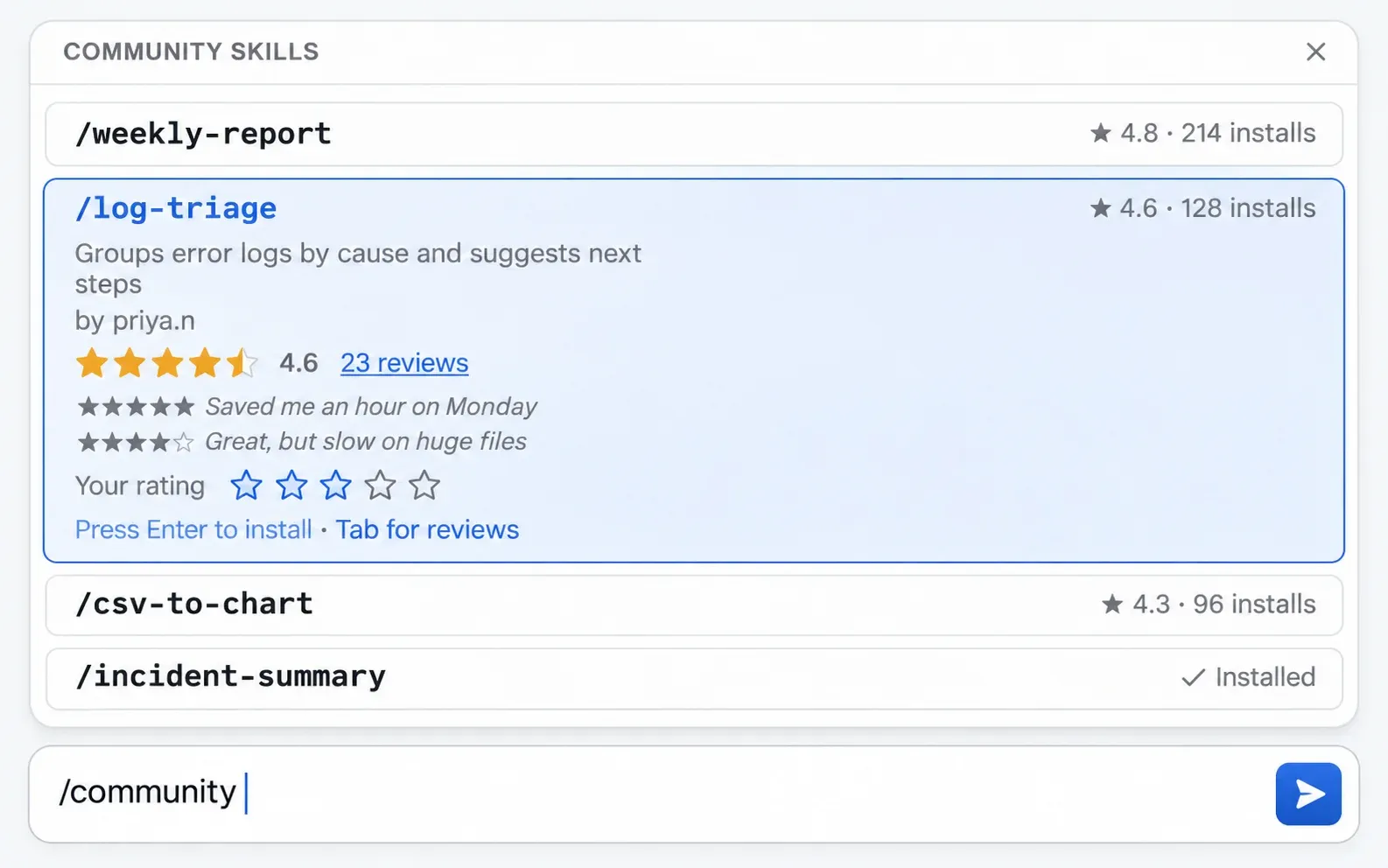
A mockup of the community panel with ratings, not a screenshot of the product.
The panel was the easy part. What took longer was deciding what an install is, who owns a name, and what a delete means, and later, how to tell a good skill from a popular one. That’s what this post is about.
See also: In Where Agent Skills Live I looked at how Claude Code, the desktop app and the Claude.ai sandbox store and distribute skills. This is the other side: building one of those channels myself.
The verbs matter, so here they are up front:
| Action | Who | What it does |
|---|---|---|
| Share | author | lists their skill in the community catalog |
| Unshare | author | hides it from the catalog; installed copies stay |
| Delete | author | removes their own skill; the catalog entry is soft deleted |
| Install | anyone | copies the skill into their own folder |
| Update | installer | replaces their copy with the latest version, if they choose to |
| Uninstall | installer | removes their copy |
The Shape: A Registry and a Copy
A skill in Nimbus is a folder with a SKILL.md, the same as everywhere else. The marketplace adds two things around that folder: a database table that says which skills are public, and a filesystem copy for every install.
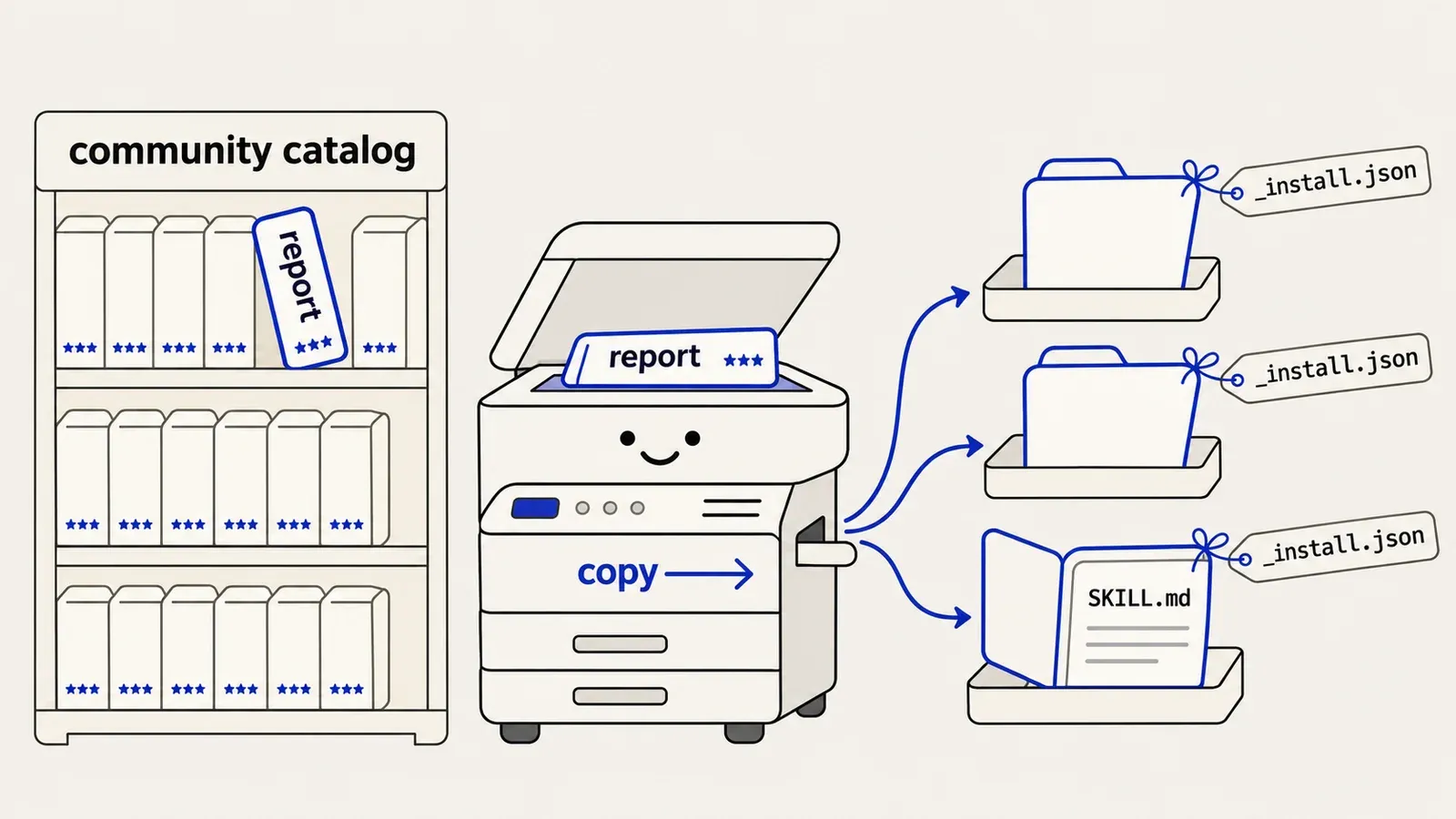
Sharing just writes a row. An install copies the author’s folder into your own skills folder and drops an _install.json next to the files. That small sidecar is how uninstall knows which row’s install_count to decrement, so initially I never needed a separate table of who installed what.
Here’s what those two pieces look like:
community_skills                      ← the public registry
  id                                  ← global ID, used for every mutation
  name, description, author_user_id
  skill_path                          ← points at the author's folder on the shared volume
  is_public                           ← unshare flips this off
  install_count
  deleted_at                          ← soft delete

users/<user_id>/skills/               ← one user's skills, uploads and installs together
├── my-own-skill/                     ← made or uploaded by this user: no sidecar
│   └── SKILL.md ...
└── someone-elses-skill/              ← installed
    ├── SKILL.md ...                  ← copied from the author's folder
    └── _install.json                 ← { community_skill_id, installed_at }
The sidecar does a second job too. A skill the user made or uploaded themselves has no _install.json, so the directory scan uses it to tell an installed skill from the user’s own.
The Filesystem Owns Existence
My first instinct was to move all skill metadata into the database. One table, one query, done.
That would have been wrong, because the agent creates skills too. Nimbus has a built-in skill-creator, a meta skill whose job is writing other skills. It interviews the user, writes the skill and packages it, straight to disk during a session, without calling any API. A database-only listing would have missed every skill it made.
So the filesystem decides whether a skill exists, and the database only records the community layer on top: what’s shared, by whom, how often it’s installed and how it’s rated. The list endpoint scans the folder and then joins in the community metadata.
What an Install Is
Every distribution system has to decide what an install is. I count three answers:
| Model | An install is… | Trade-off |
|---|---|---|
| Reference | a pointer to the author’s files | instant updates, but the author controls what runs in your sessions, forever |
| Mirror | a copy, replaced on every sync | updates arrive, hand edits are lost |
| Copy | a copy, made once | you control it after install, no updates unless you build them |
A reference is the simplest to build. Every install points at the same folder, so an author’s fix reaches everyone immediately. It also means the author keeps control over what runs in other people’s sessions, long after those people decided to trust the skill. They could rewrite the instructions next week and every installer would pick that up without noticing.
A mirror works when the publisher is someone you already trust, like the platform itself or your own org. Claude’s account sync is a mirror.
In a multi-tenant product where any user can publish, I don’t think either is a safe default. So Nimbus copies. What you installed is what you run, until you choose otherwise.
Choosing otherwise is the update flow, and it runs on the sidecar. The sidecar records which catalog entry a copy came from and when it was installed. When that entry has changed since, the skill is marked as having an update, and the user decides whether to take it. Taking it is a fresh install over the old copy. Authors’ fixes still reach people, just only the people who say yes. Going the other way, starting with references and bolting isolation on later, would have been far more painful.
Two Files, Two Owners
Skills built with the skill-creator already carried a _metadata.json. The creator writes it when it packages a skill: which conversation and user the skill came from, when it was exported, how many files it has and how big it is. It’s the record of where a skill was made.
The obvious move was to add the install fields to that file. I kept them in a separate _install.json, because they answer a different question, which is where this copy came from. The skill-creator owns one file and the marketplace API owns the other, and those two pieces of code change on different schedules. A shared skill also keeps its creation record intact when it’s copied into someone else’s folder, which I liked more than I expected to.
Making the Copy Atomic
A copy that fails halfway leaves a folder with some files and no sidecar, and the scan would list it as the user’s own skill. So the install builds the whole thing next to the target and swaps it in with one rename:
// pseudocode: installing a community skill
tmp = skills_dir / ".install-<name>-<entry id>"
copy the author's folder        → tmp
write tmp/_install.json         { community_skill_id, installed_at }
hand tmp to the agent's user    (plain file permissions)
rename tmp                      → skills_dir/<name>     // one atomic step
A rename within one filesystem either happens or it doesn’t, so the user’s folder only ever holds a complete copy with its sidecar, or nothing. If two installs race, the loser’s rename fails because the folder now exists, and that becomes the same 409 as any other “already installed”. Any failure on the way removes the temp folder, and if a crash still leaves one behind, the next install of the same entry clears it before it starts.
When the Author Deletes It
Unsharing raised a question I hadn’t thought about at all: what happens to the copies?
It ended up as two levels, because “take it down” can mean two different things.
Unshare hides the skill. It sets is_public to false, so the skill drops out of browse and can’t be installed again, but the row stays live. Share it again and the same row flips back to public, with the same ID and the same install count. Re-sharing also refreshes the description, since the catalog description is a snapshot of SKILL.md at share time.
Delete is when the author removes the skill from their own folder. Then the row is soft deleted: deleted_at is set and it’s gone from the catalog for good.
Neither one touches the installed copies. An author can’t take back a skill that’s already in someone else’s folder, which is the whole point of copying. And neither one hard deletes the row, because that would orphan the _install.json in every copy. Whenever deleting a record would break pointers somewhere else, I soft delete first now.
Soft delete also keeps the name free for reuse. The uniqueness rule only applies to live rows:
CREATE UNIQUE INDEX community_skills_author_name
  ON community_skills (author_user_id, name)
  WHERE deleted_at IS NULL;
Once a row is deleted it stops counting, so a new skill with the old name gets a fresh row and a fresh ID. Without the WHERE clause the share would fail on a uniqueness error, or an upsert would revive the old row, and old installs would point at a skill they never installed.
Names Aren’t IDs
That index has a consequence that bit me. The install endpoint first looked skills up by name. But the index is unique per author, not globally, so two authors can both share a skill called report. Looking up by name across authors is ambiguous, and sooner or later it installs the wrong one.
The fix was to use the row’s id for every mutation. The listing carries the community_skill_id, so the frontend passes it back on install and uninstall. Uninstall only decrements the count when the ID in the sidecar matches the one in the request. And when an install collides with an existing folder, the server reads that folder’s sidecar to say whose skill is in the way.
Claude Code draws the same line. A skill’s display name gets a channel prefix like anthropic-skills: so people can tell where it came from, but the sync manifest tracks each skill by a skillId, and for a skill I uploaded that’s an opaque ID, not the name (Where Agent Skills Live has the details). Prefixes keep names readable, and IDs are what the system acts on.
One Endpoint, Two Lists
The API stayed small. One route lists skills, and a query parameter switches between the two lists:
GET  /api/files/skills                    ← your skills, each with is_shared and community_skill_id
GET  /api/files/skills?community=true     ← the public catalog
POST /api/files/manage-skill              ← { action: share | unshare | install | uninstall | delete, ... }
The is_shared flag came from a bug. At first the panel tracked shared skills in a React Set that started empty every time the panel opened. Share a skill, close the panel, open it again, and it looked unshared. If the UI shows durable server state, that state has to come from the server.
Installs Aren’t Quality
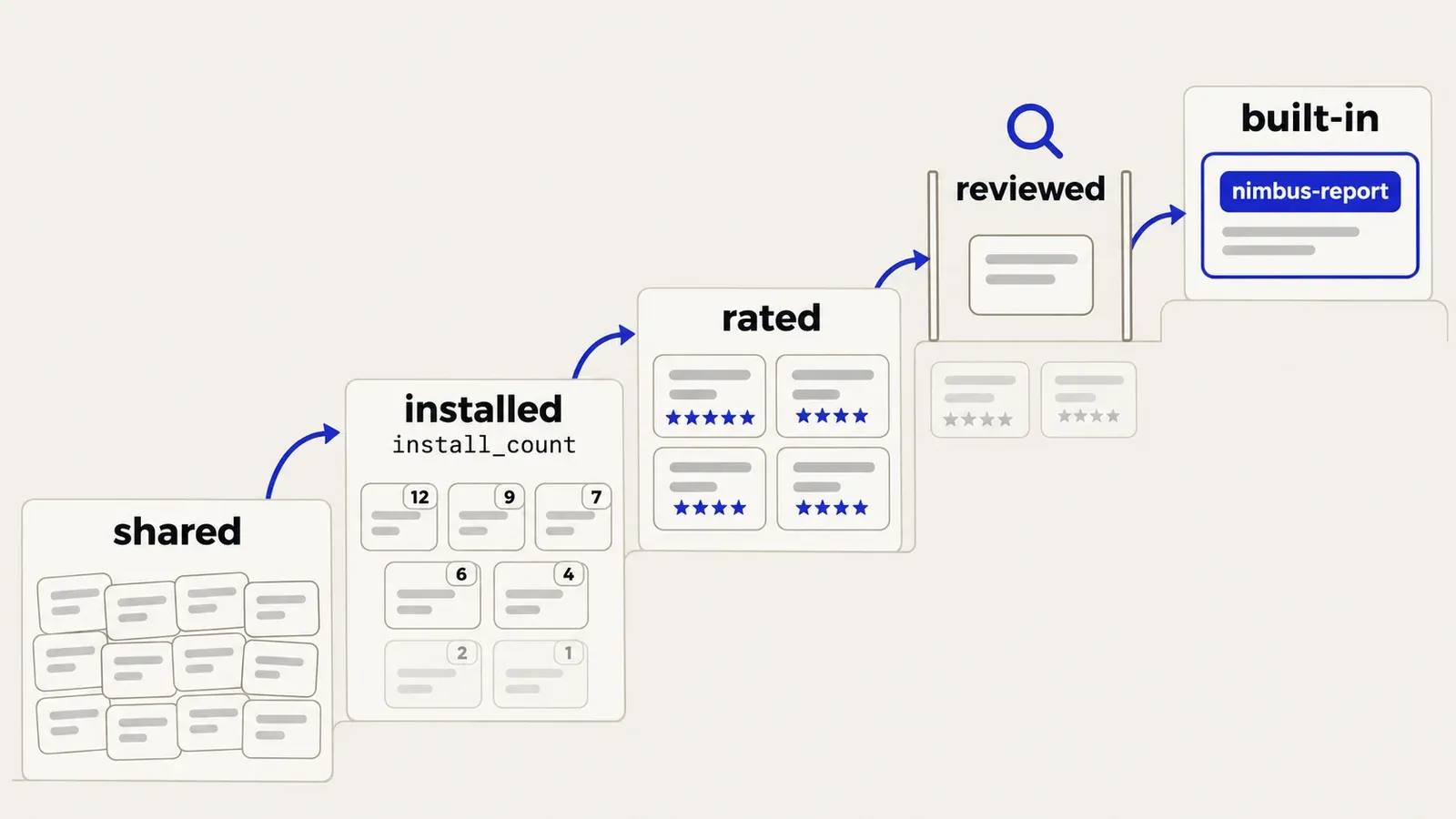
At launch the catalog was sorted by install_count, so popular skills floated to the top. Within a few weeks users were asking for a way to find the best skills, not just the most installed ones.
They had a point. Popularity and quality are different signals. An install count measures reach. It rewards whoever shared first, and says nothing about whether the skill worked once it was installed. A skill that a hundred people tried once and forgot looks exactly like one they rely on every day.
So I added ratings. Users rate community skills and can leave a short review, stored as a row in its own table that points at the catalog entry by its id. Keying ratings by name would have been ambiguous for exactly the same reason installs were.
Each user gets one rating per skill. Rating again changes your existing rating instead of adding a second one, so nobody can push a skill up by rating it repeatedly, and changing your mind after a week of use is just an edit.
The catalog shows ratings next to installs, so a newer skill with strong reviews isn’t buried under an older one with more installs.
Ratings also decide what gets promoted, and I think that’s the more useful half. Nimbus ships a set of built-in skills with the product, and the best-rated community skills are the candidates for joining it. Promotion is a deliberate step, since a skill from any user ends up in front of everyone. The skill is reviewed, tidied, and added to the built-in set under a nimbus- name, so every user gets it without installing anything. Users find skills, rate them, and the ones that keep scoring well become part of the platform. I didn’t plan the marketplace as a product discovery tool, but that’s what it turned into.
The Panel
The community catalog is its own slash command, /community, built on the same panel system as /skills. It loads the catalog once, filters as you type, and reuses the panel’s keyboard handling, so install is just Enter. The /skills panel gained share and unshare buttons on your own skills, and an Installed section with uninstall.
When ratings arrived, they went into the same rows. Each skill shows its rating inline next to its install count, and clicking it opens the reviews, where you can add your own rating or change it. You can judge a skill without leaving the list.
Install feedback shows inline, and a 409 means “already installed”, not failure. My first version had a single catch that turned that 409 into a red “Failed to install”. Now each status code gets its own message.
Treat Uploads as Untrusted
Uploads came first. Before the marketplace, the skill-creator could package a skill as a zip, people passed the zips around, and the recipient uploaded one to use it. The community catalog replaced that, but I left uploads working until everyone had moved their skills over.
Either way, a skill is untrusted input: a folder of instructions and scripts that will end up in someone else’s agent.
Cap it, then count real bytes. The zip is capped at 20 MB and 500 entries, and the uncompressed sizes in its headers have to add up to 5 MB or less. Headers can lie, though. A decompression bomb can claim a tiny size and expand far beyond it, so the header check is only a cheap first filter. The real limit is a running count of the bytes actually written, and extraction stops the moment it passes 5 MB.
Sanitise every string that becomes a path. A skill name has to be its own basename, use only letters, digits, -, _ and ., and not be all dots. Then the path is resolved and checked to still be inside the user’s skills folder. The same check runs on every entry in the zip, so a ../../ entry gets skipped.
Don’t let the upload claim provenance. Any _install.json inside an uploaded zip is dropped. Otherwise a folder could pretend to be an install of a popular entry, and uninstalling it would decrement that entry’s count.
Normalise what lands on disk. Extracted files are handed to the agent’s unprivileged user with plain permissions, whatever the archive asked for.
Don’t let an upload wake the agent. This is the one I’m least proud of. An early version installed an uploaded skill automatically, by sending a prompt into the user’s live session. The upload then waited on a full model round-trip, the model sometimes asked a question instead of installing, and because the caller named the session by its conversation ID, one user could aim that prompt at someone else’s session. I removed it. An upload now only extracts files, and the user asks the agent to install.
Most of this is ordinary upload hygiene. The difference is that an agent will follow whatever instructions are in the files.
What a Shared Skill Can Run
A skill can ship scripts, and the agent runs them with its shell tool as soon as it decides to use the skill. A good rating doesn’t tell you whether those scripts are safe, so the boundary has to be where they run:
- Every conversation gets its own container, with its own workspace.
- The agent runs as an unprivileged user, and so does everything it starts.
- The platform’s secrets aren’t there. A subprocess inherits its parent’s whole environment by default, and anything a script prints, the model can read. So credentials, internal endpoints, model keys and user IDs are blanked for the agent’s process only. The platform tools that need them run in the server process instead.
- No permission prompts. Nobody is there to answer them, which is fine only because the container is the sandbox.
A system prompt rule also tells the agent not to print environment variables. I wouldn’t rely on it. What protects the secrets is that they aren’t there.
How an Installed Skill Reaches the Agent
The Nimbus agent runs on the Claude Agent SDK, so skills load as they do in Claude Code (Where Agent Skills Live covers how). But being in the user’s folder isn’t enough to get there. There are two steps.
Installed means staged. The install only copies the skill into the user’s folder on the shared volume, and the success message says so.
Active means in the session’s workspace. The SDK loads skills from a .claude/skills folder inside the conversation’s workspace. Skills reach the workspace in two ways:
- At session start. The conversation’s container copies in the built-in skills first, then the user’s own folder. Nothing is mounted, so each session has its own copy.
- During a session. The agent’s
manage_skilltool copies one skill into the live workspace, usable from the next message.
One side effect of copying: uninstalling from the panel doesn’t remove the skill from a session that already loaded it.
When Two Skills Have the Same Name
Names collide in three places, and they didn’t follow the same rule:
- In your own folder, it’s a hard stop: a 409 that names the other skill’s author.
- At session start, the copy never overwrites and built-ins go in first, so the built-in wins and yours never loads.
- Mid-session,
manage_skillreplaces what’s there, so your copy wins.
Two of those are silent, and they disagree. Promotion made it worse: a promoted skill exists twice, as the built-in and as every installed community copy. With the same name, those users would get the built-in at session start and their own copy mid-session, depending only on how it was loaded.
So promoted skills get a namespace. A community skill called report becomes nimbus-report when it’s promoted, so it never collides with the installed copies and load order stops mattering. The prefix is reserved: uploads and shares whose names start with nimbus- are refused, so no user can publish something that looks built in. It’s the same idea as Claude Code’s anthropic-skills: prefix. I went with a plain prefix because Nimbus loads skills straight from folder names, and a : in a folder name is asking for trouble.
The prefix stops the collision but not the duplication. A user who installed report now has two skills with nearly the same description, and the model may pick either.
What’s Next
Two things are deliberately left for later:
- Cleaning up after promotion. The sidecar records which catalog entry each copy came from, so promotion can find the installed copies of a promoted skill and offer to remove them. Built-ins that weren’t promoted still follow the load-order rule, so they need reserved names too.
- The source of truth. When the agent’s own skill operations go through the API, the split between disk and database is worth another look.
What I’d Tell Someone Building This
Once a skill is installed, the copy belongs to the person who installed it, and trust comes from where it runs, not from who wrote it. The rest follows from that:
- Decide what an install is before you build anything. Reference, mirror or copy decides your update story, your delete story and your trust model.
- Let the filesystem own existence if anything writes skills without going through your API, and keep provenance in its own file.
- Soft delete anything other records point at, and scope unique indexes to live rows.
- Use global IDs for every mutation, installs and ratings alike.
- Don’t rank by installs alone. Ratings tell you whether a skill worked, and which ones deserve to become part of the platform.
- Treat every upload as hostile, and make the runtime the sandbox.
- Keep “installed” and “active” apart, and reserve a prefix for platform skills before promotion forces you to.
Methodology & Limitations
This comes from my own build notes (May 2026 and the weeks after) and my memory of building it, so it includes changes made after the first release, ratings among them. Nimbus is a stand-in name. The agent runs on the Claude Agent SDK; the rest of the infrastructure is described in general terms. The SQL index and the endpoint list are as built, and the block marked “pseudocode” shows the approach, simplified for this post.
In a later post: the skill-creator meta skill, and how it builds the skills that end up in the marketplace.