
The Moment It Clicked
I was deep in a conversation with Claude when it rendered a p5.js tree, branches swaying in simulated wind, leaves shifting colors, all inline in the chat next to a code block. I right-clicked.
Inspect Element.
It wasn’t a <div> with some SVG. It was an <iframe> on a subdomain I’d never seen before: 4459eb7bd50487d2e81354363748235c.claudemcpcontent.com. Inside that iframe: a full HTML document with its own <head>, injected globals, design tokens, and a p5.js sketch running in a sandbox.
That subdomain raised every question. Who owns claudemcpcontent.com? What’s that 32-character hash? Why an iframe and not a <div> injected into the page? How does the widget resize itself when p5.js finishes rendering?
I went deep studying how this system works, inspecting the rendered DOM in browser dev tools, analyzing the tool call schemas visible in API payloads, and observing output patterns across dozens of interactions. What I found is a four-layer architecture that’s far more engineered than it appears from the outside. This post walks through every layer, based entirely on publicly observable behavior.
Table of Contents
Open Table of Contents
- The Four-Layer Architecture
- Layer 1: The Gate Rules - When Visuals Happen
- Layer 2: The Module System - Loading Design Specs
- Layer 3: Cross-Cutting Rules - The Design System
- Layer 4: Library References - The Runtime Bindings
- The iframe Architecture - Where Widgets Actually Live
- The Communication Bridge
- What the Host Pre-Loads
- The Security Model
- The Tool Schema - What Claude Sees
- The Streaming Constraint
- Multiple Widgets in One Conversation
- Design Decisions Worth Stealing
- 1. Parametric CSP - Security Policy Travels with the URL
- 2. The Two-Div Animation Pattern
- 3. Session-Scoped Subdomains - Isolation by Origin
- 4. Module Loading as Tool Calls - Docs Over Training Data
- 5. The Gate Layer Prevents Visual Spam
- 6. Injected Globals - Clean Communication Boundaries
- 7. GPU-Composited-Only Animations
- Methodology & Limitations
- Closing Thoughts
The Four-Layer Architecture
The visualizer isn’t a single feature. It’s a layered system with strict dependency rules.
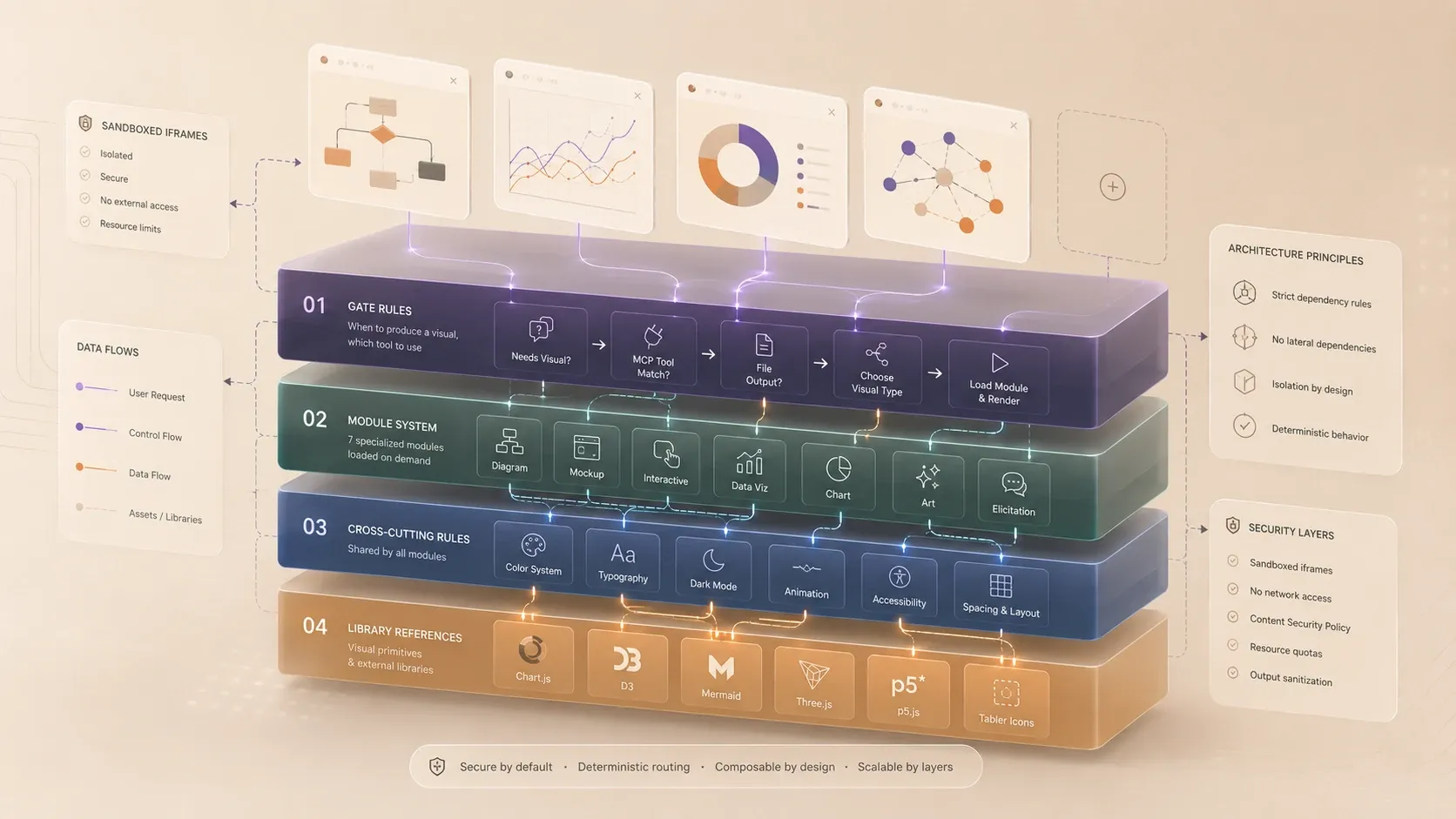
Each layer has a single responsibility. Modules never depend on each other. They all depend downward to cross-cutting rules and libraries, but never sideways. A diagram module doesn’t reference the chart module. This isolation is deliberate.
Layer 1: The Gate Rules - When Visuals Happen
Not every message gets a visual. The gate layer runs on every message before anything else. Based on observing tool call sequences across dozens of interactions, I hypothesize the following decision tree - not a scoring system. The first matching gate fires and the chain stops. This is my mental model of the system’s behavior, inferred from consistent patterns rather than official reference.
The Four Steps
Step 0: Does this need a visual?
  → NO  : answer in prose, STOP
  → YES : continue

Step 1: Is a connected MCP tool a category match?
  → YES : use MCP tool, STOP
  → NO  : continue

Step 2: Does the user want a file?
  → YES : write to /mnt/user-data/outputs/, present_files, STOP
  → NO  : continue (inline visual)

Step 3: Which visual type?
  → load relevant module
  → render via visualizer:show_widget
  → interleave with prose
What Counts as a “Visual Request”
The gate layer classifies triggers into three categories:
Direct triggers - explicit visual verbs:
“show me”, “visualize”, “diagram”, “chart”, “draw”, “illustrate”, “graph”, “map”, “plot”
Spec triggers - noun phrases describing a visual artifact (no verb needed):
“comparison table of X vs Y”, “state machine for order: draft → submitted”, “contact form with name, email, message”
Proactive triggers - where a visual genuinely aids understanding:
“How does X work?” (mechanism with spatial structure), “Compare X and Y” (quantitative, multiple dimensions), “Here is my data: [CSV]” (data has shape worth seeing)
The MCP Priority Rule
This is one of the more interesting design decisions. When an MCP server is connected that handles diagrams, it wins over the visualizer, even if the visualizer would produce a prettier result. The rule is strict:
Style preference never overrides a connected MCP tool. Only a genuine capability gap justifies bypassing it.
Tool: "creates diagrams"
Request: "diagram the auth flow"
→ MCP tool wins

Tool: "creates static diagrams"
Request: "interactive drag-and-drop topology"
→ Genuine capability gap → Visualizer wins
This prevents the system from silently hijacking MCP tools for aesthetic reasons.
Layer 2: The Module System - Loading Design Specs
The module system contains seven specialized visual modules, each loaded on demand via the visualizer:read_me tool call before any code is written.
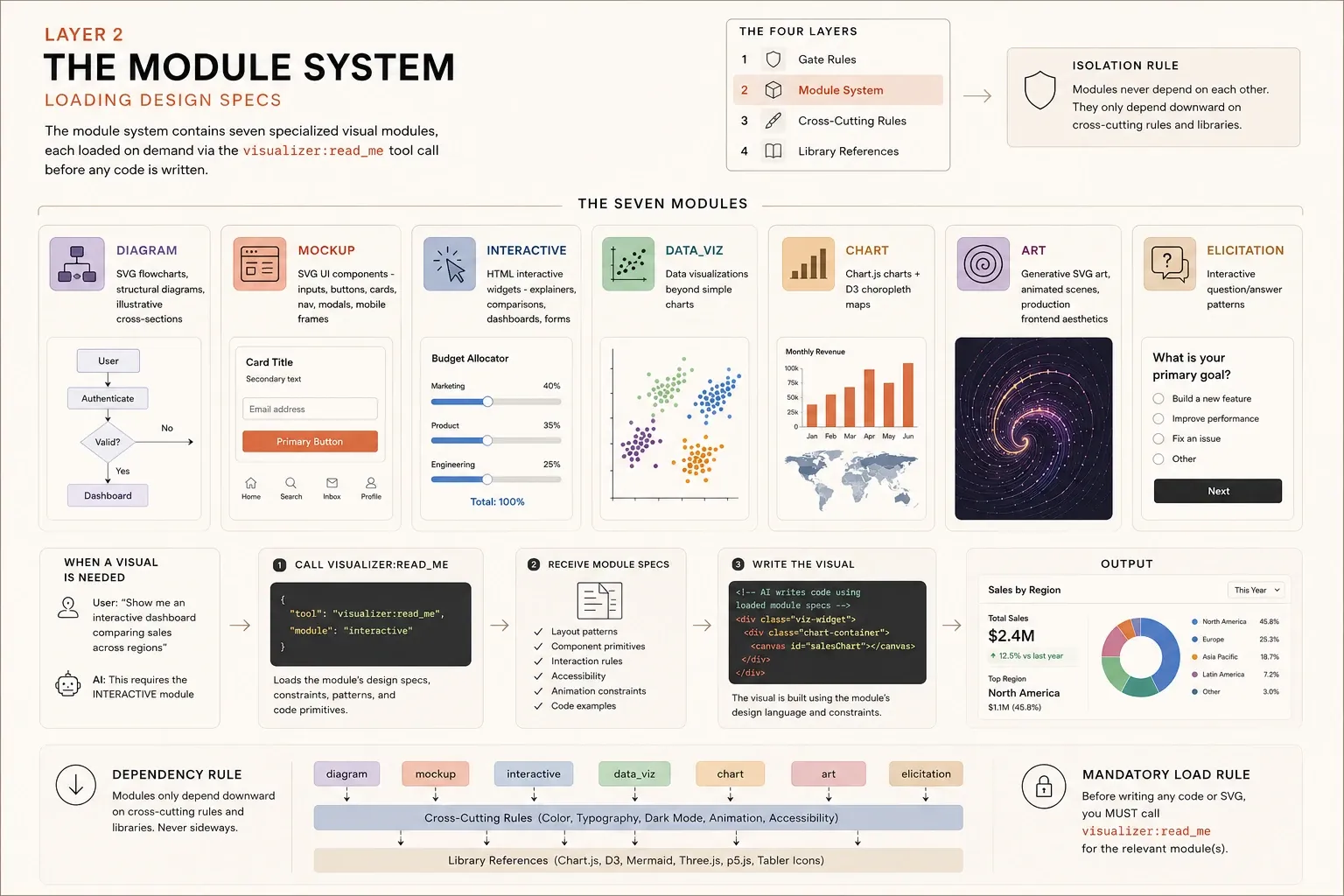
The Seven Modules
| Module | Covers |
|---|---|
diagram | SVG flowcharts, structural diagrams, illustrative cross-sections |
mockup | SVG UI components - inputs, buttons, cards, nav, modals, mobile frames |
interactive | HTML interactive widgets - explainers, comparisons, dashboards, forms |
data_viz | Data visualizations beyond simple charts |
chart | Chart.js charts + D3 choropleth maps |
art | Generative SVG art, animated scenes, production frontend aesthetics |
elicitation | Interactive question/answer patterns |
The Mandatory Load Rule
Before writing any visual code, the system must call visualizer:read_me:
Before writing any code or SVG:
  1. Identify which module(s) apply
  2. Call visualizer:read_me for each
  3. Only then write the visual
Why this matters: module constraints aren’t in the model’s training data. Exact pixel values, class names, and primitive snippets require loading. Skipping this step degrades output quality because the model falls back on generic patterns instead of the system’s specific design language.
This is essentially a just-in-time knowledge injection system. The model doesn’t memorize all module constraints, it loads them on demand, like a developer reading docs before implementing a feature.
See also: A similar on-demand context injection was used in my PR agent.
SVG vs HTML vs Canvas
- SVG (diagram, mockup) - vector graphics, scales cleanly, supports CSS theming
- HTML (interactive, elicitation) - DOM elements, full interactivity, forms, steppers
- Canvas (chart, data_viz, art) - Chart.js, D3, p5.js render to
<canvas>, no CSS theming
Canvas elements ignore CSS variables, that’s why data colors use hardcoded hex.
Module Dependencies
Modules have a strict dependency graph. They depend downward but never sideways:
diagram   → cross-cutting only (color, typography, dark mode)
mockup    → cross-cutting + diagram (inherits SVG class system)
interactive → cross-cutting (+ optional chart module)
chart     → cross-cutting + library layer (Chart.js, D3)
data_viz  → cross-cutting + library layer
art       → cross-cutting + library layer (D3, Three.js, p5.js)
              optionally uses chart for "data portraits"
elicitation → cross-cutting only
When multiple modules apply, load dependencies first:
mockup + diagram→ load diagram first (mockup uses diagram’s SVG class system)art + chart→ load chart first (art uses chart for data-as-art patterns)
Layer 3: Cross-Cutting Rules - The Design System
Every module shares the same color system, typography rules, dark mode contract, and animation constraints. These are never redefined, modules reference them.
The Color System
Nine color ramps, each with seven stops (50 → 900). The full hex values live in the module spec files, what matters here is the semantic mapping (shared across all modules):
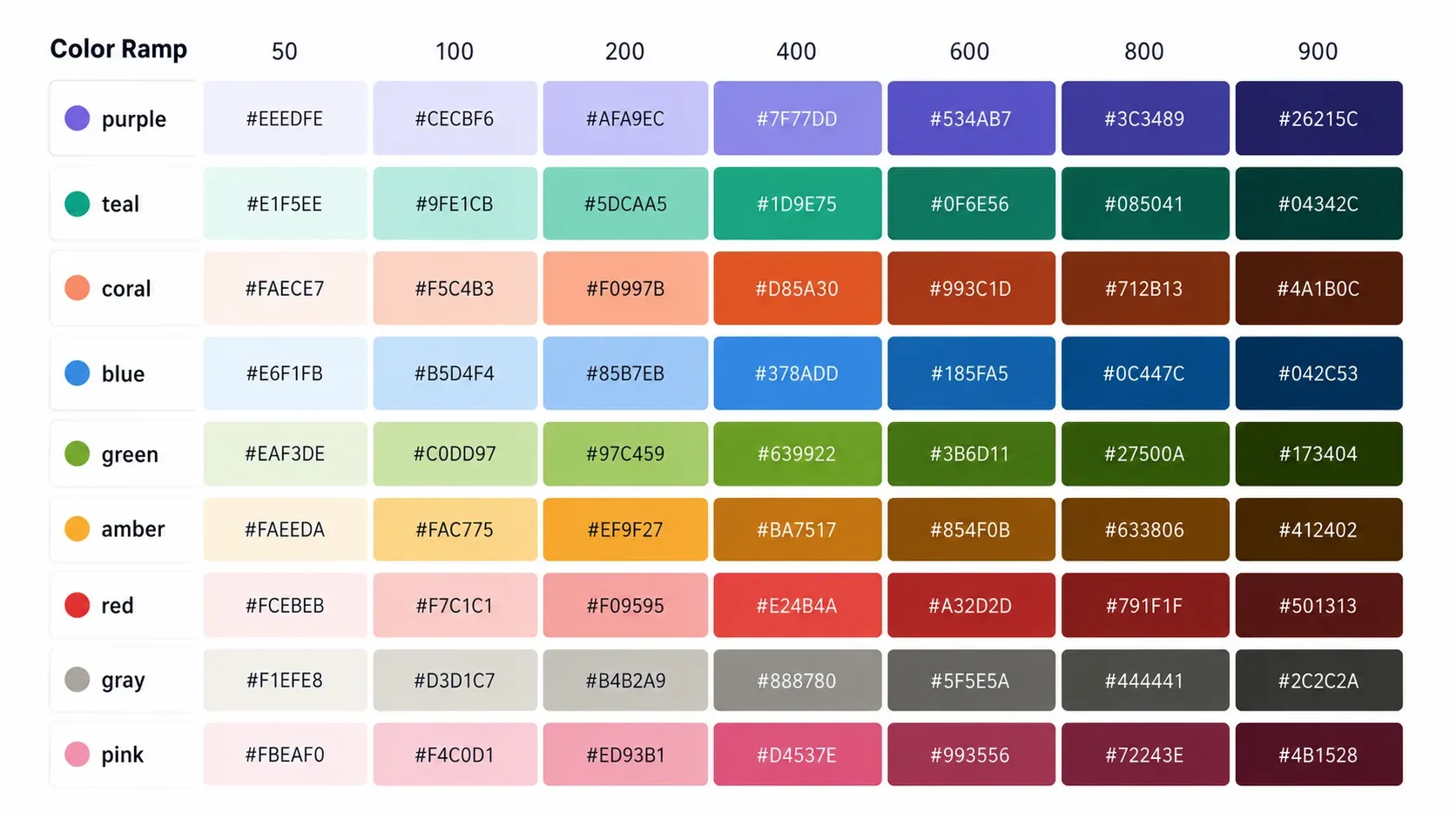
gray    → neutral, structural, inactive
blue    → info, primary, networking, calm
teal    → healthy, success, fast, organic
green   → positive, growth, add
amber   → warning, slow, degraded, caution
red     → error, critical, failure, danger
purple  → compute, features, primary category
pink    → secondary accent, creative
Usage recipes: Light mode uses 50 fill / 600 stroke / 800 text. Dark mode flips to 800 fill / 200 stroke / 200 text. Data encoding uses any stop directly as hardcoded hex, never as a CSS variable.
The critical rule: max 3 ramps per diagram. Color encodes meaning, never decoration. Same ramp = same meaning throughout one output.
The CSS Variable vs Hardcoded Hex Split
UI elements use CSS variables (var(--color-background-primary)) so they adapt to dark mode. Data encoding uses hardcoded hex ("#E24B4A") so it stays fixed - that red means “error” regardless of theme. Canvas elements (Chart.js) must use hardcoded hex since canvas ignores CSS variables entirely.
Typography
Two font sizes (14px primary, 12px secondary), two weights (400 regular, 500 medium, never bolder), and always sentence case. The one exception: 10px metadata labels use letter-spacing: 0.06em with uppercase.
Animation Constraints
Only GPU-composited properties are safe to animate: transform (translate, scale, rotate), opacity, and stroke-dashoffset for line-draw effects. Never animate width, height, top, left, font-size, or SVG fill - they trigger layout recalculation or repaint.
Loop duration: 0.8s minimum, 2.0s maximum, 1.0-1.6s sweet spot. All animations must be wrapped in @media (prefers-reduced-motion: no-preference) { }.
Transparent Backgrounds
SVGs use transparent backgrounds and CSS variables (--color-background-primary) to inherit the light/dark theme and blend with host.
Design rules alone can’t render a D3 graph or animate a Three.js scene. Layer 4 bridges the gap with library-specific specs that turn design intent into runtime execution.
Layer 4: Library References - The Runtime Bindings
Modules that compute or render (chart, art, data_viz) need libraries - Chart.js, D3, Three.js, p5.js, Mermaid. But modules don’t import these directly. Layer 4 contains the library-specific specifications: exact configs, constrained APIs, forbidden patterns.
What Lives in Layer 4
| Library | Layer 4 Contains |
|---|---|
| Chart.js | Config templates, color mapping rules, forbidden chart types |
| D3 | Allowed APIs, color scale patterns, geographic projection specs |
| Three.js | Material presets, lighting constraints, camera defaults |
| p5.js | Instance mode patterns, animation constraints, canvas sizing |
| Mermaid | Diagram type configs, theme overrides, class mappings |
The Indirection Pattern
Layer 4 sits between modules and the actual CDN imports:
Module (chart) → Layer 4 (Chart.js spec) → CDN (Chart.js library)
Module (art)   → Layer 4 (Three.js spec) → CDN (Three.js library)
The module says “I need a bar chart.” Layer 4 says “use Chart.js with these specific configs, these color mappings, this animation duration, never use these chart types.” The actual library loads from a CDN at runtime inside the iframe.
This indirection is why the system can evolve library versions without retraining. The specs in Layer 4 can reference Chart.js 4.x patterns while the CDN loads whatever version is current. Modules stay stable; library bindings update independently.
The CDN Constraint
Libraries must load from one of four allowlisted CDNs:
esm.sh | cdnjs.cloudflare.com | cdn.jsdelivr.net | unpkg.comScripts from other domains are blocked by CSP. This isn’t Layer 4’s concern, it’s enforced by the iframe’s Content Security Policy. But Layer 4 specs must only reference import paths from these domains.
The iframe Architecture - Where Widgets Actually Live
Note: The DOM structure, sandbox attributes, and communication patterns here are directly observable. Some details, like the exact height measurement method, animation mechanism, or pre-load sequence, are inferences from behavior patterns. Treat them as architectural guidance, not confirmed implementation.
Widgets don’t render as inline DOM - they render inside iframes served from a dedicated widget-hosting subdomain. This entire iframe infrastructure is Claude’s implementation of the MCP Apps specification - the standard way MCP servers deliver interactive UIs in chat.
The MCP Apps pattern: a tool declares a ui:// resource in its description, the host fetches it, renders the HTML in a sandboxed iframe, and establishes bidirectional communication via JSON-RPC over postMessage. Claude’s visualizer is a specialized MCP server that uses this extension to render inline diagrams, charts, and interactive widgets.
The DOM Structure
Inspecting the rendered output in browser dev tools reveals the MCP Apps lifecycle wrapper pattern:
<!-- Outer animation wrapper -->
<div class="ease-out transition-all overflow-hidden">

  <!-- PLACEHOLDER div - MCP Apps lifecycle: reserves layout space -->
  <div id="mcp-app-placeholder-{tool_call_id}" style="height: 0px;"/>

  <!-- CONTAINER div - MCP Apps lifecycle: wraps the live iframe -->
  <div id="mcp-app-container-{tool_call_id}">
    <iframe
      title="visualize: {title}"
      style="width: 100%; height: {N}px; background-color: transparent;"
      sandbox="allow-scripts allow-same-origin allow-forms"
      allow="fullscreen *; clipboard-write *"
      src="https://{hash}.claudemcpcontent.com/mcp_apps
           ?connect-src={allowed_fetch_domains}
           &resource-src={allowed_asset_domains}">
    </iframe>
  </div>

</div>
Session-Scoped Subdomain Hashing
Every widget in a conversation shares the same subdomain hash, a 32-character hex string computed from the session or conversation ID:
Widget 1: https://4459eb7bd50487d2e81354363748235c.claudemcpcontent.com
Widget 2: https://4459eb7bd50487d2e81354363748235c.claudemcpcontent.com
          ↑ Same hash - same conversation
Different conversations produce different hashes. Different users produce different hashes. The exact derivation isn’t publicly documented, but the behavior is consistent across observations.
Why this matters: Same hash = same browser origin for all widgets in a conversation. Widget A and Widget B can technically read each other’s raw localStorage. This is why window.storage (server-side, keyed by userId + conversationId) exists instead of relying on raw localStorage for persistence.
The Two-Div Pattern - Smooth Height Animation
Every widget produces two sibling divs before the iframe:
placeholder (height: 0px)     → reserves layout space
container   (holds iframe)     → visible but collapsed initially
The sequence:
t=0  Tool call fires → DOM created (placeholder at 0px)
t=1  iframe src loaded → host injects CSS vars, Tabler, globals
t=2  widget_code renders (via innerHTML or srcdoc)
t=3  Scripts execute → widget renders (Chart.js draws, p5 renders)
t=4  Widget measures scrollHeight → postMessages to parent
t=5  Parent sets iframe.style.height + placeholder.style.height
t=6  CSS transition-all animates height from 0 → final
t=7  Widget fully visible
Without the placeholder, the page would jump when the iframe expands. With it, layout space is reserved before animation, content below the widget moves smoothly.
CSP From Query Params
The mcp_apps endpoint is a parametric page server - a core MCP Apps pattern. The Content Security Policy travels with the URL:
src="https://{hash}.claudemcpcontent.com/mcp_apps
     ?connect-src=https://esm.sh+https://cdnjs.cloudflare.com+...
     &resource-src=https://esm.sh+https://assets.claude.ai+..."
The server reads the query params, generates CSP headers, and serves an HTML page with:
- Design tokens (CSS custom properties for theming)
- Tabler icons webfont
- Injected JavaScript globals (
sendPrompt,openLink,window.storage) - A
<body>that receives the streamed widget content
The allowed CDN domains - observable in the iframe’s src URL - match common JavaScript library CDNs plus Anthropic’s own asset domain. Scripts from any other domain are silently blocked by CSP.
The Communication Bridge
Since the iframe is cross-origin, all communication with the parent page happens via postMessage. The host injects three globals into every widget.
sendPrompt(text)
Sends a message to Claude as if the user typed it. Triggers a new response turn. Use it for things Claude should reason about: explanation, analysis, recommendations. Never for things JS can compute locally.
The convention: always use ↗ arrow suffix on sendPrompt buttons:
// Include full context so Claude can reason about it
sendPrompt(
  `The latency chart shows a spike at 14:00 reaching ${maxVal}ms. ` +
  `Service: ${serviceName}. Error rate: ${errorRate}%. ` +
  `What are the likely causes and how should I investigate?`
)
openLink(url)
Opens an external URL from within a widget. Necessary because window.open() and <a href> don’t work reliably in the iframe sandbox (no allow-popups).
window.storage
Persistent key-value storage backed by server-side infrastructure, scoped by userId + conversationId. Under the hood, storage works via an async request/response pattern, each request gets a unique ID, a pending Map tracks promises, and a 10-second timeout rejects if the parent never responds.
Key naming convention: table:record_id (e.g., todos:todo_123). Under 200 chars, no whitespace.
Critical detail: get() throws on missing keys, never returns null. Always wrap in try/catch.
What the Host Pre-Loads
Before widget code streams into the iframe body, the host has already set up the environment. This follows the MCP Apps pattern - the host injects resources before the app’s HTML renders, so widgets feel native rather than bolted on.
Pre-loaded by the host (always available):
- Design token stylesheet from
assets.claude.ai- all CSS custom properties for colors, spacing, typography, border radius - Tabler icons webfont from
assets.claude.ai- the icon set used across all modules - Injected JavaScript globals -
sendPrompt,openLink,window.storage, height reporter - CSS variables that respond to light/dark mode
What widgets must import (CDN allowlist only):
Only four CDN domains are allowlisted: esm.sh, cdnjs.cloudflare.com, cdn.jsdelivr.net, unpkg.com. Libraries like Chart.js, D3, Mermaid, Three.js, and p5.js must be explicitly imported from these CDNs. If a widget needs a library from a different domain, it silently fails to load.
The assets.claude.ai domain is the interesting one, it’s Anthropic’s own asset server, and it’s the bridge that makes widgets look native rather than bolted on.
The Security Model
The iframe security posture follows the MCP Apps spec’s sandboxing model. Four overlapping mechanisms, each covering a different threat vector.
Sandbox: allow-scripts allow-same-origin allow-forms - the iframe can execute JavaScript and access its own origin, but is completely cut off from claude.ai’s DOM, cookies, or localStorage. The sandbox enforces cross-origin boundaries and blocks top navigation, popups, and modals.
Key nuance: allow-scripts + allow-same-origin together effectively lift the sandbox’s JavaScript restriction for the iframe’s own origin. The sandbox’s real protection isn’t against the iframe executing code - it’s against cross-origin access. Think of it less as a code sandbox and more as a boundary enforcer: the iframe is fully sovereign inside its own origin, but completely cut off from everything outside it.
Permissions Policy: fullscreen *; clipboard-write * - lets p5.js and Three.js canvases go fullscreen and copy-to-clipboard buttons work. Camera, microphone, geolocation, and payment APIs are all blocked.
CDN allowlist: Only esm.sh, cdnjs.cloudflare.com, cdn.jsdelivr.net, and unpkg.com are permitted. Scripts from other domains are silently blocked by CSP.
For the full security model details, see the MCP Apps specification.
The Tool Schema - What Claude Sees
Two tools drive the entire system:
visualizer:read_me - loads module design specs before rendering. Accepts a modules array (one of the seven module names) and a platform parameter (mobile, desktop, or unknown). This is the forced-context-loading mechanism, module constraints aren’t in training data, they’re injected fresh each time.
visualizer:show_widget - renders inline HTML/SVG as an iframe widget via the MCP Apps extension. Three parameters:
title- a short snake_case identifier that doubles as the download filename (“q4_revenue_by_product_line”, not “chart”)widget_code- the SVG or HTML code, auto-detected by first tagloading_messages- 1-4 messages shown while rendering. Fascinating tonal constraint: for serious topics (illness, war, grief), messages must be boring - describe what the code is doing in generic terms. For casual topics, they can be playful (“Bribing bars to stand taller”).
The Streaming Constraint
One of the trickiest aspects of the system is that widget content streams in token by token. The SVG/HTML code is sent sequentially as the LLM generates it, and the iframe receives and renders the content progressively. The browser is essentially painting the diagram in real time as tokens arrive, less about a special streaming protocol and more about writing the code in the right order so the visual builds up naturally, rather than popping in all at once at the end.
Writing Streamable Code
SVG and HTML both stream naturally, as the browser renders elements as soon as it encounters them. With SVG, early elements like <defs> and the first <rect> appear before the rest of the document is complete. HTML works the same way: <div>, <style>, and text nodes render incrementally as they arrive. This gives a free progressive build effect that canvas-based rendering doesn’t have (nothing visible until draw() is called).
The convention is straightforward:
<style>          ← rules load first, ready before elements appear
<svg> / <div>    ← visible content renders as it streams in
<script>          ← executes after streaming completes
Two nuances that make this work in practice:
Inline styles over <style> blocks. A stylesheet at the top might not have fully parsed by the time elements it targets start appearing. Inline styles apply immediately as each element streams in. For inputs, controls, and anything where visual correctness during mid-stream rendering matters, inline styles are more reliable.
No gradients or shadows. These cause visual “flashing” during streaming, since the browser recalculates them on every DOM update, and during streaming every new token is a DOM update. Flat fills render cleanly as each element arrives, producing a smooth build-up instead of constant flickering.
Scripts at the bottom. During streaming the DOM is incomplete, so a script that runs before its target elements exist will fail. Placing scripts last means the full document has been parsed by the time they execute.
Height Reporting Pitfalls
The iframe reports its height via document.body.scrollHeight. Two patterns break this:
position:fixed removes elements from flow. Fixed-position elements don’t contribute to scrollHeight, so the parent sees 0px and the widget collapses. Use flexbox or position: absolute instead, as both contribute to their container’s height.
display:none during streaming hides content from scrollHeight. When streaming completes and display is restored, the height jump may not trigger the CSS transition properly, causing the widget to appear collapsed.
Multiple Widgets in One Conversation
Each widget is a separate iframe. They persist in the DOM for the lifetime of the conversation. This creates interesting implications:
All widgets in a conversation share the same origin (same subdomain hash). Widget A’s localStorage is readable by Widget B. window.storage provides proper isolation via server-side namespacing.
All widgets may run simultaneously. setInterval() in Widget A could keep running when you scroll to Widget B. Charts might update when off-screen. Consider pausing animations on visibility change using the Intersection Observer API to avoid unnecessary work.
Storage key collisions matter. Multiple widgets using counter as a key will overwrite each other. Use namespaced keys: todos:todo-123, settings:user, leaderboard:alice.
Design Decisions Worth Stealing
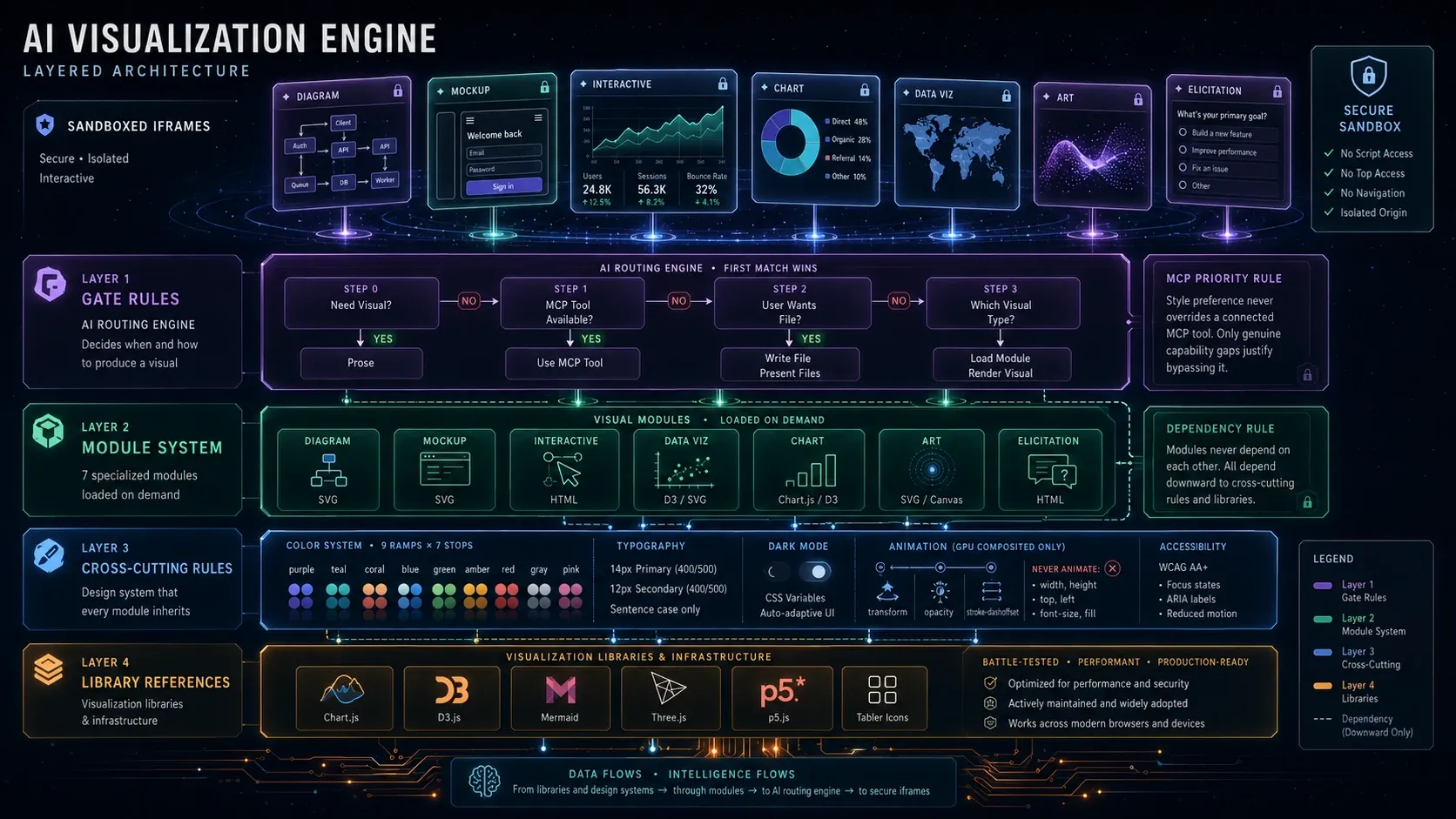
If you’re building any kind of embedded widget system - whether for an AI chat, a dashboard, or a plugin platform - these seven patterns from the visualizer are worth studying.
1. Parametric CSP - Security Policy Travels with the URL
The iframe server is a generic parametric page host. The parent controls what the iframe can load through URL query params. No server redeploy needed to add a new CDN source. Security policy becomes a parameter, not a config file.
2. The Two-Div Animation Pattern
The placeholder + container pattern solves a CSS problem (cross-origin iframe height) with DOM structure. No JS hacks, no polling. Just HTML that enables smooth animations and prevents layout jumps.
3. Session-Scoped Subdomains - Isolation by Origin
HMAC of conversation ID as subdomain gives each conversation its own origin. Widgets within a conversation share localStorage (useful for multi-step dashboards), but cross-conversation leaks are impossible by browser enforcement, not just by convention.
4. Module Loading as Tool Calls - Docs Over Training Data
Design specs aren’t baked into the model. They’re loaded fresh via read_me before each render. This is the pattern for any system where constraints need to evolve independently of the model that produces the output. New modules can be added by adding a spec file and a trigger word, no retraining required.
See also: The same principle underpins Building an In-house MCP Server for Code Reviews, where pluggable instruction files load review-specific context on demand.
5. The Gate Layer Prevents Visual Spam
The most important decision is whether to visualize at all. Binary gate rules (not scoring) keep behavior predictable. The trigger classification system - direct, spec, proactive, and non-triggers - maintains signal-to-noise ratio. First match wins, chain stops.
6. Injected Globals - Clean Communication Boundaries
sendPrompt, openLink, and window.storage give widgets a stable API without exposing parent implementation details. The widget doesn’t know or care how the parent handles the message - it just calls the function. This is the adapter pattern applied to cross-origin communication.
7. GPU-Composited-Only Animations
If you’re rendering in iframes, layout-triggering animations (width, height, top, left) cause repaint storms across frame boundaries. Stick to transform and opacity - they composite on the GPU without triggering layout or paint in the parent page.
Next up: In the follow-up article, I’ll walk through the implementation - an agent server with visualizer MCP, client-side widget manager, postMessage RPC bridge, and full starter code to build your own version.
Methodology & Limitations
This analysis is based entirely on publicly observable behavior - no insider knowledge, source code access, or Anthropic employees were involved. Observations were made in Claude Desktop & Claude web using standard browser developer tools: DOM inspection, network request analysis, and tool call schema observation across dozens of interactions. Some details (the subdomain hash derivation, window.storage internals, gate rule classification) are inferred from consistent patterns rather than confirmed sources. Anthropic actively develops this system - CSP allowlists, sandbox attributes, and module specifications may evolve. If you’re building on these observations, verify against current behavior.
Closing Thoughts
I started this investigation because I right-clicked on a p5.js tree and found an iframe I didn’t expect. What I found instead was a system designed with the kind of intentionality that’s rare in features most users will never inspect.
The visualizer isn’t impressive because it renders charts in chat. Any framework can do that. It’s impressive because someone thought through when to visualize, how to sandbox the output, how to keep the design consistent across auto-generated code, and how to make the whole thing feel native in a chat interface that was never designed for interactive widgets.
The whole thing is built on the MCP Apps spec - a standard for delivering interactive UIs from MCP servers. Claude’s visualizer is one implementation of that spec, with its own design system, module loading, and streaming constraints layered on top.
That’s the real lesson here: the best features aren’t the ones that do the most - they’re the ones where every boundary was drawn deliberately.