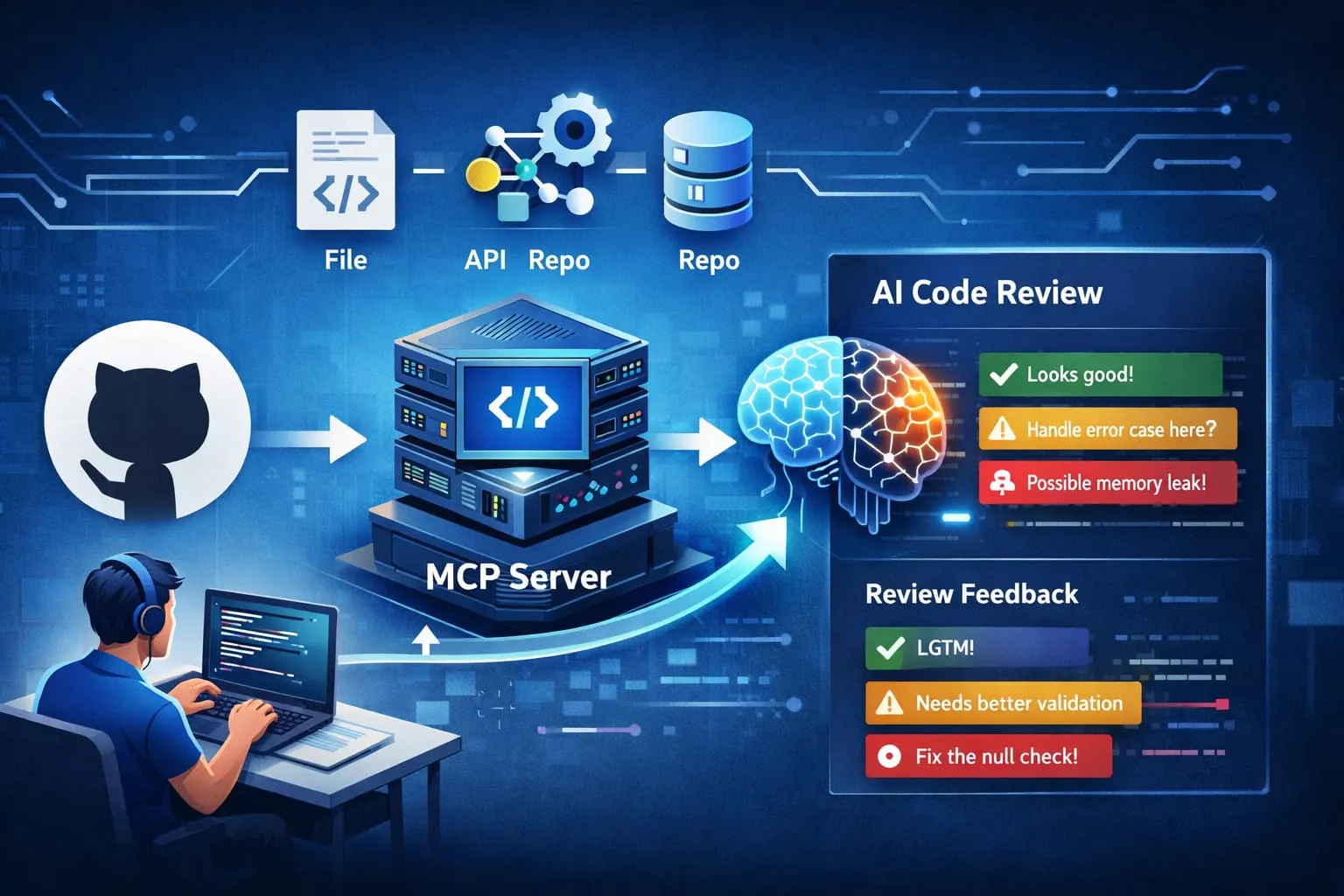
The Problem That Caught Us Off Guard
When our team started using Cursor and GitHub Copilot, productivity shot up. But code review collapsed.
PRs that used to be 200-300 lines hit 1,500. Senior developers—already stretched thin—were drowning. The problem wasn’t that code was worse. It was that code was bigger, and reviewers had no context.
Before reviewing a single line, they had to hunt:
- Jira for requirements
- Confluence for architectural patterns
- Similar PRs for conventions
- Discussion threads for constraints
That context gathering took 10-15 minutes per PR. With more PRs and large number of changes, it became impossible.
The bottleneck wasn’t code analysis. It was context fragmentation. Developers wrote AI-assisted code without understanding the architecture and organizational patterns. Reviewers couldn’t review it properly without scattering across five different systems.
We needed a tool that brought context into code review, not a tool that generated more code.
Building an MCP Server (with Claude Code CLI)
We built an MCP server that does three things:
- Gets PR context from BitBucket: Changed files, diffs, review status
- Fetches organizational knowledge: Jira tickets, Confluence documentation, architectural decisions
- Helps with code review: Suggests comments, highlights potential issues, provides context-aware feedback
The key architecture decision: Each developer runs their own local instance via stdio.
Not a central server. Not shared tokens. Not latency. Each developer configures it in their editor:
{
  "mcpServers": {
    "PR Review": {
      "command": "pragent",
      "args": ["-token=xxx", "-jiratoken=yyy", "-confluencetoken=zzz"]
    }
  }
}
The server runs locally. Communication happens through stdin/stdout. No network calls to a central service. Each person’s tokens stay on their machine. This eliminates authentication complexity, distributed infrastructure costs, and token billing—each developer uses their own subscription tokens.
flowchart TD
    Dev(["`👤 **Developer**
    VS Code / Cursor`"])

    subgraph Local["🖥️ Developer's Machine"]
        direction TB
        AITool["`🤖 **AI Agent**
        Claude / Cursor / Copilot`"]
        MCP["`**MCP Server**
        pragent`"]
    end

    subgraph Tools["MCP Tools"]
        direction LR
        T1["`review_pr
        get_pr_changes`"]
        T4["`get_single_file_diff
        get_file_content`"]
        T5["`comment_line
        comment_pr`"]
        T2["`get_jira_issue`"]
        T3["`get_confluence_doc`"]
    end

    BB[("`**BitBucket**
    PR / Diffs / Files`")]
    Jira[("`**Jira**
    Tickets`")]
    Confluence[("`**Confluence**
    Docs`")]

    Dev -->|"Review PR #123"| AITool
    AITool <-->|stdio| MCP
    MCP --> T1 & T4 & T5 & T2 & T3
    T1 & T4 -->|personal token| BB
    T5 -->|posts comments| BB
    T2 -->|personal token| Jira
    T3 -->|personal token| Confluence

    AITool <-->|"steer / feedback & comments"| Dev
    Dev -.->|"Approve posted comments"| BB

    classDef developer fill:#f06292,stroke:#e91e63,color:#fff
    classDef agent fill:#7986cb,stroke:#5c6bc0,color:#fff
    classDef mcp fill:#64b5f6,stroke:#1976d2,color:#fff
    classDef tools fill:#81c784,stroke:#388e3c,color:#fff
    classDef external fill:#ffca28,stroke:#f9a825,color:#111

    class Dev developer
    class AITool agent
    class MCP mcp
    class T1,T2,T3,T4,T5 tools
    class BB,Jira,Confluence external
We wrote the entire codebase using Claude Code CLI—the tool that helped us build it became the tool using it. Now let’s walk through what we learned.
Lesson 1: The Reviewer’s Impossible Choice
Here’s the real issue we discovered: AI tools write code fast, but they write a lot of code. A developer using Claude, Copilot, or Cursor would ask: “Add user authentication.” The AI would generate 800 lines across five files. Previously, that would have taken two days to write manually—the developer would understand every line. Now, they paste it in fifteen minutes and open a PR.
The code works. It passes tests. But the developer doesn’t fully understand what they’re shipping.
This put enormous pressure on code reviewers, especially tech leads and senior developers. A team lead might have 15+ developers reporting to them, everyone using AI tools, everyone pushing PRs. The lead gets tagged as reviewer on many PRs per day. At that point, they either review quickly and poorly, review thoroughly and work 14-hour days, or skip reviews and hope nothing breaks.
The real bottleneck wasn’t finding bugs. It was ensuring alignment with organizational patterns and constraints. A senior developer can spot obvious bugs in 5 minutes. But checking whether code follows architectural patterns? Whether it handles edge cases mentioned in the Jira ticket? That takes 15-20 minutes—time leads don’t have.
The agent helped by providing context and highlighting patterns:
- “This file implements the decorator pattern, which is used elsewhere in [this file]. Consider consistency.”
- “This PR adds a database call in [function]. According to the Confluence docs, all DB calls should use [pattern].”
- “The related Jira ticket (PROJ-1234) mentions [constraint]. This implementation might not handle [edge case].”
Lesson: Tools for code review shouldn’t optimize for speed. Optimize for depth under pressure. The agent doesn’t make reviews faster—it makes reviews more thorough without taking longer.
Lesson 2: Context Beats Speed
Our first assumption was wrong. We thought code reviews were slow because reviewers lacked automation. Actually, they were slow because context was scattered.
Before reviewing a single line, our senior developers would spend 10-15 minutes gathering context:
- Open the Jira ticket to understand requirements
- Search Confluence for architectural patterns and guidelines
- Look through similar PRs to understand established conventions
- Hunt through discussions to understand constraints
When we built the agent to fetch this automatically, something interesting happened. Reviewers didn’t just move faster—they reviewed better. They looked deeper, asked better questions, caught issues they’d previously missed because they were no longer fatigued from context-switching.
The win wasn’t speed. The win was quality.
Lesson: When building tools for code review, optimize for context availability, not review velocity. Better reviews are faster reviews—but context is the bottleneck, not analysis speed.
Lesson 3: Instructions Matter More Than You Think
When we first released the agent, it was… noisy. It would suggest comments on every line. “Consider adding a docstring.” “This variable name could be clearer.” “Add error handling here.” Dozens of suggestions per PR.
Developers hated it.
We realized: the agent was trained to be helpful, but helpful isn’t the same as useful. Useful feedback is:
- Rare (only when something is genuinely wrong)
- Specific (not generic suggestions)
- Tied to constraints (referencing Jira requirements or Confluence patterns)
So we redesigned the instructions:
- “Only comment on ADDED lines (+). REMOVED lines need comments only if the removal creates problems. CONTEXT lines (unchanged) should never be commented on.”
- “Don’t suggest style improvements. Only flag actual issues.”
- “Always tie comments to context: reference the Jira ticket, the Confluence pattern, or a similar implementation elsewhere in the codebase.”
- “No generic positive feedback. But for larger issues, phrase comments constructively—acknowledge what works, then explain the concern.”
- “Avoid critically harsh wording. Be direct, but not harsh.”
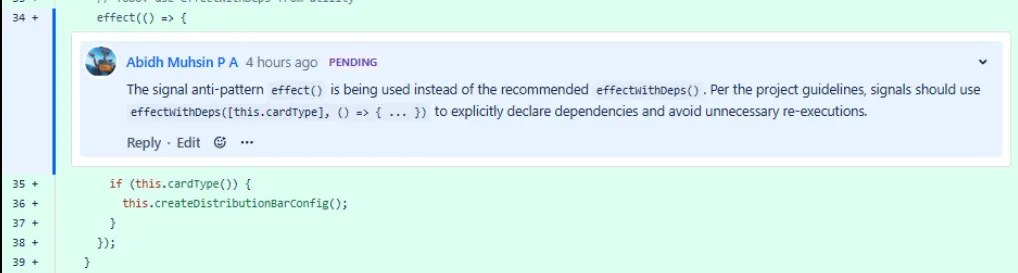
Example: A specific, context-tied comment that references project guidelines and explains the reasoning.
This reduced comment volume by 70%. Quality went up dramatically.
Lesson: For AI code review, less is more. One specific, context-tied comment is worth 10 generic suggestions. The instructions that push the AI toward silence are more valuable than the ones that push it toward helpfulness.
Lesson 4: Context Windows Are Real
When an AI tool reviews a PR, context is expensive.
API responses are verbose. A Jira ticket alone is 1,000+ tokens. A full list of changed files with metadata is 2,000+ tokens. A Confluence page is 1,500+ tokens. Add the PR diff, and you’re quickly at 15,000-20,000 tokens just for context setup.
Every token costs money. Each API call burns tokens. Each token of context reduces space for Claude’s reasoning.
So the review tool uses a smart two-phase approach:
Phase 1: Lean Setup
- List of changed files (preprocessed—just names and change types, no metadata)
- Preprocessed PR diff (stripped of unnecessary metadata, summarized for large PRs)
- Review instructions (dynamically loaded via MCP per project/domain, guiding on-demand context retrieval)
We learned aggressive preprocessing:
- Strip metadata from API responses completely
- Summarize Confluence pages instead of including full HTML
- When a PR is too large, limit initial diffs to the most changed files
- Include only relevant Jira fields (description, status, comments)
Phase 2: On-Demand Deeper Context
- The AI tool sees what changed, gets guidance on tools, then decides what to fetch
- Simple PRs stay lean if they contain full context needed for review within the diff
- Complex PRs get richer context based on what the tool calls:
- Call
get_jira_issueif the PR mentions a ticket—to understand requirements and constraints - Call
get_confluence_docif the PR or Jira issue mentions a specific Confluence page—to fetch architectural patterns and guidelines - Call
get_single_file_diffwhen the original diff view is too large—fetch and review individual file diffs based on the file list - Call
get_file_contentwhen PR changes imports a file and uses it but it’s not fully visible in the diff—to understand what’s actually being run
- Call
Lesson: Context windows sound infinite until you’re paying for them. Start lean with preprocessed data. Provide tools for deeper context. Let the AI tool decide what’s relevant for each review.
Then vs Now: This system was developed when context windows were capped at 200k tokens, making aggressive preprocessing essential. With current models supporting 1M+ tokens, the two-phase approach—lean setup followed by on-demand context loading—would perform even better, allowing richer initial diffs and fewer round-trips.
Lesson 5: Model Changes Drift Instructions
Upgrading Claude models—even minor versions—subtly changed how the agent interpreted instructions.
Same instructions. Different behavior.
Claude 3.5 Sonnet: verbose feedback. Claude 4: terse. Instructions that worked perfectly in one version drifted in the next. The model prioritized different things.
How we managed it:
- Version instructions with models: Each instruction file notes which Claude version it’s tuned for. When upgrading, we test and adjust.
- Use explicit constraints, not implicit: Don’t say “be concise.” Say “limit comments to 3 per file maximum.” Numbers survive model changes. Adjectives don’t.
- Test after upgrades: Run 5-10 reviews post-upgrade. If output drifts from expectations, adjust instructions.
- A/B test instruction changes: When tweaking, run the same PR twice with different instructions and compare.
What we learned: LLM models behave differently than their documentation suggests. Instructions that worked perfectly become outdated with model updates. Build for drift, not stability.
Lesson 6: Stdio Mode Solved the Auth Problem (and Costs)
Running a central MCP server means managing authentication at the server level: shared tokens, rotation, permission scoping, auditing. Plus, every API call consumes your quota and generates costs.
We chose stdio mode instead. Each developer attaches the MCP tools to their own agent in VS Code or Cursor:
No central server. No shared authentication infrastructure. Each developer configures their own instance with their own tokens and uses their own subscription. No shared token costs, no central bot token.
Lesson: For MCP servers, stdio mode eliminates authentication complexity and costs. Especially when its a devtool or an internal org usage. Each developer attaches to their own instance with their own tokens. No service to manage, no shared token problem, no IT overhead.
Lesson 7: Know Your Users (and Let Them Choose Instructions)
We built this agent for code review. We found it was most useful for:
- Tech leads reviewing code from their team (architectural alignment and pattern consistency)
- Senior developers doing final reviews before merge (constraint and pattern checking)
- Onboarding junior developers (explaining architectural decisions or doing self-review)
Where it was least useful:
- Peer review between juniors (need mentoring, not automation)
- First-time features without documented context jira or docs (no baseline for “good”)
- Emergency hotfixes (skipped under time pressure)
What we learned: Make instructions pluggable for different contexts.
Different review types need different priorities. Instead of building separate tools, we made instruction files configurable:
- Default:
instructions.mdfor all reviews — core generic instructions (correctness, patterns, constraints) - Domain-specific:
ui-instruction.md,api-instruction.md,security-instruction.md - Project-specific:
projects/mobile-app/instructions.md,projects/auth-service/instructions.md
Reviewers choose on the fly: Review PR #456 using ui-instruction.md or Review PR #457 using projects/auth-service/instructions.md
Same agent, different priorities. No code changes needed.
This same pattern—loading context on demand via tool calls—powers Claude’s visualizer module system. See Reverse-Engineering Claude’s Inline Diagrams for the architectural deep dive.
Lesson: Don’t build one solution for all reviewers. Make instructions a first-class parameter. Let teams own their domain guidance.
Bonus: Interactive Review Workflow
The real power emerges from combining an MCP server with an interactive AI tool:
The MCP server provides the tools:
- Fetch PR diffs, Jira tickets, Confluence docs with a single tool call
- Post comments to BitBucket directly
The AI tool provides the conversation:
- Developer asks: “Does this handle the edge case in PROJ-1234?” → AI tool uses
get_jira_issueto check, answers with context - Developer says: “Review this section more carefully” → AI tool refocuses, calls tools on specific files
- AI tool suggests a comment → Developer copies it into chat, asks for modifications → AI tool refines it in real-time
- Developer asks: “Why did we choose this pattern?” → AI tool explains from Confluence docs it just fetched
This turns code review from a bot’s one-shot analysis into an interactive conversation—developer and AI tool exploring the code together, with the tool having direct access to organizational context. Instead of trying to understand the entire codebase in one pass, the user can go deep into a single feature PR and understand it completely. You can ask questions, provide context, and steer the review in real-time. It’s targeted, focused, and efficient.
What Didn’t Improve
Not everything improved:
- First-time contributors still needed significant human mentoring and guidance. AI feedback alone isn’t enough for onboarding.
- Architectural discussions required human judgment. AI raises questions, but can’t make design decisions.
- Hotfix reviews under pressure often got skipped anyway. Emergency mode bypasses normal processes.
The lesson: AI-assisted review improves routine work. It doesn’t replace human judgment in edge cases.
Technical Debt We Accepted
The codebase isn’t perfect:
- No caching layer: Every Confluence search hits the API. Should add Redis for documentation (which rarely changes), but it complicates deployment.
- No retry logic: API calls fail sometimes. Should implement exponential backoff, but it hasn’t caused production issues yet since agent retries.
- Sequential file processing: Could parallelize, but response times are acceptable (2-3 seconds for typical PRs).
- Limited error recovery: If one tool fails, the whole review stops. Should implement graceful degradation.
We chose 80% solutions that work over 100% solutions that take forever.
What’s Next
We’re exploring:
- Custom rule engine for team/project-specific checks (“All auth middleware usages should pull in permissions mapper for context and comment the actual permission granularity in effect”)
- Historical analysis to track which types of issues are caught most frequently
- Batch review mode for reviewing multiple related feature PRs from different repos in one shot
- Evals for consistency to ensure instructions and model changes don’t drift behavior—automated testing against baseline review outputs
- Skill-based CLI tools as an alternative to MCP, MCP works well for now, but exploring whether Claude Code CLI skills could provide a lighter-weight option
The architecture is solid enough that these feel like natural extensions, not awkward retrofits.
Takeaways for Building MCP Servers for Code Review
If you’re building an MCP server to help with code review in your organization:
-
Solve the context problem, not the code-analysis problem. Everyone can spot obvious bugs. The bottleneck is understanding context. Build for context aggregation.
-
Local stdio deployment beats central servers. Each developer runs their own instance with their own tokens. No shared secrets, no central authentication, zero latency, zero organizational overhead. This is the killer feature of MCP deployed via stdio.
-
Use an AI tool to build it. We built the entire codebase using Claude Code CLI: describe features, Claude implements them, test locally, iterate. Any AI coding tool works, but the benefit is obvious: the tool that helps you build it is the same tool that will use it.
-
Expect API and model surprises. APIs behave differently than their documentation. LLM models drift with upgrades, same instructions, different behavior. Version both your API integration and instructions. Test after every change.
-
Understand your users. Tech leads need different features than junior developers. Build for your most-impacted users first (usually senior people handling multiple reviews).
-
Preprocess aggressively. API responses are verbose. Strip metadata. Summarize content. Every token you save is money saved and faster responses.
-
Keep humans in the loop. MCP generates comment drafts in pending state. Humans review, modify, publish. Reviewer stays responsible—they approve before anything posts.
-
Iterate instructions based on real feedback. Your first version will be wrong. Your second will be partially wrong. Feedback loops reveal what actually works. Current instructions represent months of accumulated knowledge from real usage.
Conclusion
We started trying to “automate code reviews.” The real problem was context fragmentation—reviewers hunting across BitBucket, Jira, Confluence, drowning in context gathering, not complexity.
An MCP server running locally on each developer’s machine solves this. It automatically fetches diffs, extracts requirements, searches patterns, provides context. Faster? Yes. But the real win is quality—reviewers spend those minutes on deeper analysis, not context hunting. The difference between “code looks reasonable” and “code fits our architecture.”
The lessons—about token management, API behavior, explicit instructions, model changes—apply to any MCP server. Build tools that help reviewers understand faster, not tools that review faster.
MCP server. Built with Claude Code CLI. Local instance per developer. One year of real usage. Shared here for teams facing the same problem.