The List That Didn’t Add Up
Earlier this year I built a community skills marketplace into Nimbus, a product I work on. Users share a skill, others browse a catalog, install it with a keypress, and can uninstall or unshare it from the same panel. It worked. But I’d made every design call on my own: what gets stored where, what an install actually is, who owns a name, what happens when an author deletes something people already installed.
Recently I asked Claude Code a lazy question, “what are your bundled skills”, and got back a list that didn’t add up. Some skills were called code-review and loop. Others were called anthropic-skills:pdf and anthropic-skills:docx. My own project skills had no prefix at all. One skill in a cloud session showed up as session-start-hook (startup-hook-skill), with two different names for the same thing.
I got curious and went looking at how Claude Code answers the same questions: through ~/.claude, the Claude desktop app’s config folder, the Claude.ai chat sandbox and a cloud session. This post is what I found, at the time of writing.
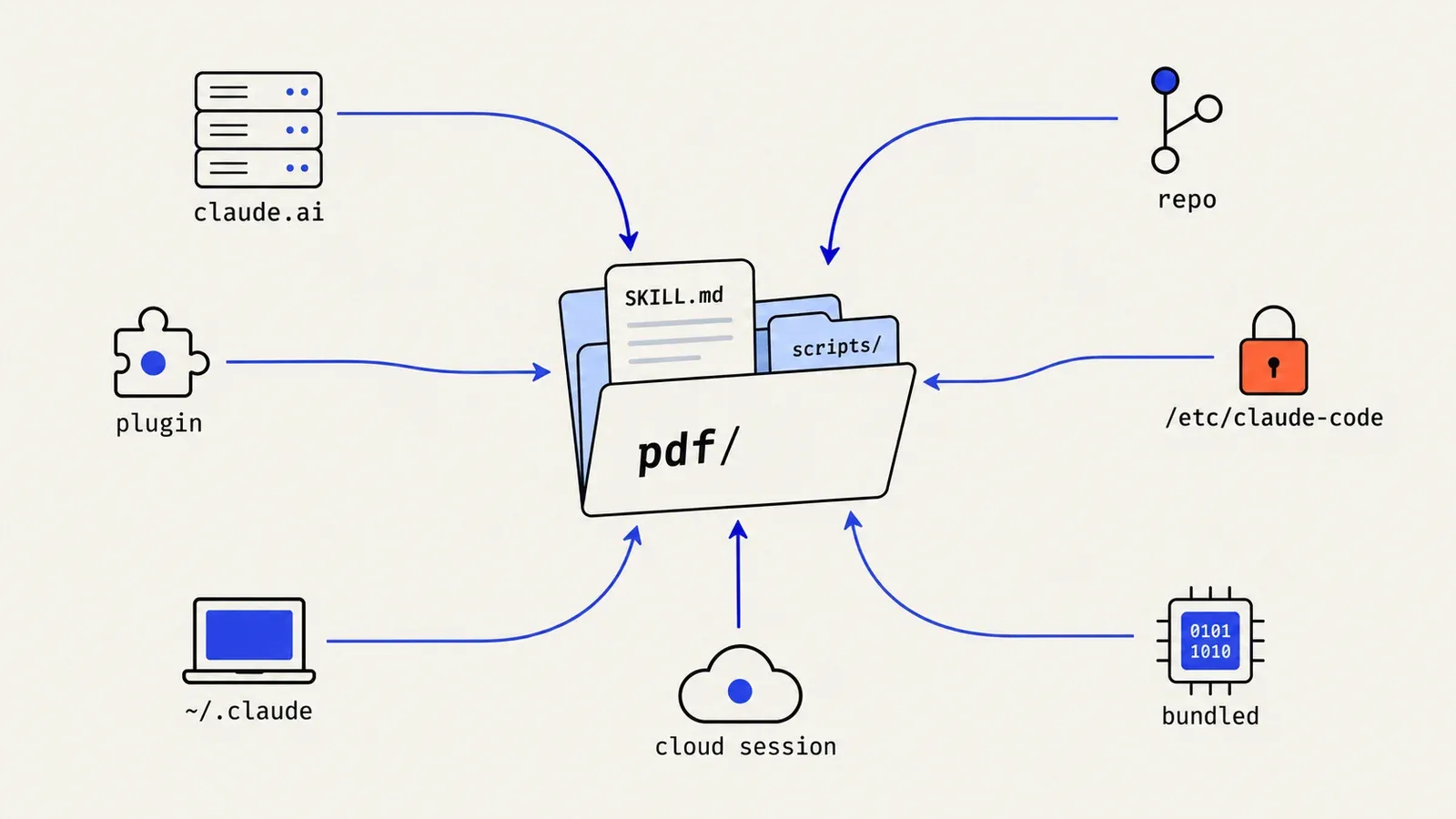
The format of a skill is not the interesting part. Distribution is. Who is allowed to ship a skill? How does it get to the machine? What happens when two of them have the same name? How do skills from seven different routes end up as one list in front of the model, and what does that list cost?
The Unit: A Folder
Quick recap for anyone who hasn’t written one. A skill is a folder with a SKILL.md, and the file starts with YAML frontmatter:
pdf/
├── SKILL.md        ← frontmatter + instructions
├── LICENSE.txt
└── scripts/
    └── fill_form.py ...
---
name: pdf
description: Use this skill whenever the user wants to do anything with PDF files...
---
# PDF Processing Guide
...The model always sees the description. The body loads only when the skill is used. Scripts and references are read or run by the agent itself, on demand.
What goes in the body surprised me. The docx skill doesn’t teach Word from scratch, because the model already knows the libraries. It’s a list of things you only learn by getting them wrong in this environment: pages default to A4, tables need widths on every cell or they break in Google Docs, bullets must come from a numbering definition, and every file gets rendered to PDF and actually looked at. A good skill is environment knowledge, not general knowledge.
Almost every channel below ships this same folder. What changes is who puts the folder there and how.
1. Mount It Read-Only (Claude.ai Chat)
In Claude.ai chat, code runs in a throwaway Ubuntu container. Skills are just a mounted directory:
/mnt/skills/
├── public/      ← docx, pdf, pptx, xlsx, file-reading, frontend-design ...
├── examples/    ← a much larger set: deep-research, mcp-builder, theme-factory ...
└── user/        ← custom skills you upload (absent when you have none)
public/ is read-only, and the whole container is gone when the session ends. The model doesn’t scan the folder. It gets a short list with each skill’s name, description and location, and opens a SKILL.md only when a task matches.
The detail I keep coming back to is examples/. It had far more skills on disk than the chat listed as available: only four were switched on. Storage and enablement are separate. The platform mounts a superset, and a per-account setting decides which descriptions reach the model.
2. Compile It In (Bundled Skills)
I assumed /code-review was a SKILL.md somewhere on disk. It isn’t. Bundled skills in Claude Code are compiled into the program and registered in memory at startup. Where a SKILL.md has fixed fields, a bundled skill can have functions. This is the shape, as pseudocode (my reconstruction, not the program’s source):
// pseudocode: how a bundled skill like /code-review is defined
registerBundledSkill({
  name: "code-review",
  aliases: ["review"],
  whereToRun(session) {                 // decided per session
    return session.canShowFindingsList ? "inline" : "subagent";
  },
  buildPrompt(args) {                   // runs on every call, no stored prompt
    const changed = gitDiffNumstat();   // lines changed in the diff
    const finders = clamp(Math.ceil(changed / 150), 2, 8);
    return recipeFor(args.effort, { finders, fix: args.fix, comment: args.comment });
  },
});
That buildPrompt does real work. From medium effort up, the review fans out: finder subagents look at the diff from several angles, roughly one per 150 changed lines, then one verifier per finding labels it CONFIRMED, PLAUSIBLE or REFUTED. A static markdown file can’t size itself to your diff like that.
Not every bundled skill is generated in code. /verify carries an embedded SKILL.md and writes it out to disk the first time it runs. The bundled set also depends on the host: inside the desktop app, Claude Code registers a much smaller set than the CLI does.
This channel gives you logic and free versioning. But only the vendor can use it, and every fix needs a release.
3. Sync From the Account (claude.ai → disk)
Skills enabled on your claude.ai account appear in Claude Code as anthropic-skills:<name>. They aren’t fetched when the agent uses them. They’re synced to disk first:
~/.claude/skills/synced/
├── .bucket-<org>_<account>            ← empty marker file
└── <org-uuid>_<account-uuid>/
    ├── .last-complete-round           ← "<round-uuid> cli"
    ├── manifest.json
    └── docs/ docx/ pdf/ pptx/ xlsx/ skill-creator/ ...
The folder is keyed by org and account, so switching accounts never mixes skill sets. It’s a mirror, not a working copy: edit a synced skill by hand and the next sync overwrites it. To customise one, copy it to ~/.claude/skills/<new-name>/ and edit the copy.
manifest.json is small (entries trimmed, and combined from two accounts):
{
  "lastUpdated": 1792986338883,
  "skills": [
    { "skillId": "pdf",  "name": "pdf",  "source": "anthropic",         "updatedAt": "2026-07-10T19:23:15Z", "description": "..." },
    { "skillId": "docs", "name": "docs", "source": "anthropic-example", "updatedAt": "2026-09-30T00:33:27Z", "description": "..." },
    { "skillId": "skill_01CXk…", "name": "technical-blog-writer", "source": "plugin", "updatedAt": "2026-02-06T04:11:22Z", "description": "..." }
  ]
}
The third entry is a skill I uploaded myself, with an opaque ID instead of a slug. It still showed up as anthropic-skills:technical-blog-writer. So the prefix doesn’t mean “written by the vendor”. It means “arrived through the claude.ai sync channel”. The prefix describes the route, not the author. Authorship lives in the manifest’s source.
Where the prefix comes from
None of the synced files contain it. SKILL.md just says name: pdf. The loader adds it when it registers a synced skill:
// pseudocode
const SYNC_NAMESPACE = "anthropic-skills";
function registeredName(skill) {
  return skill.name.startsWith(SYNC_NAMESPACE + ":")
    ? skill.name
    : `${SYNC_NAMESPACE}:${skill.name}`;
}
Reserved namespaces
Here’s a check I didn’t expect. Your own skills aren’t allowed to claim that prefix:
// pseudocode
const RESERVED = ["anthropic-skills:", "claude-ai:"];
for (const skill of localSkills) {            // personal, project, managed; not plugins
  const inFolder = RESERVED.find((p) => skill.folder.startsWith(p));
  const inName = RESERVED.find((p) => skill.frontmatterName.startsWith(p));
  if (inFolder || inName) {
    warn(`not loading "${skill.name}": that name is reserved for synced skills; ` +
         (inFolder ? "rename it" : "change its name: line"));
    skip(skill);
  }
}
Drop a folder called anthropic-skills:pdf into ~/.claude/skills/ and it gets refused. That stops a repo from shipping a skill that looks like it came from your account. Plugin skills are exempt, since they already carry their own plugin: prefix.
Bare names are a privilege, not a right
Synced skills are always registered under the prefixed name. Whether they also answer to the bare name (pdf) depends on whether anything local already owns it:
// pseudocode
for (const s of syncedSkills) {
  register(`anthropic-skills:${s.name}`, s);   // always
  if (localSkillsFailedToLoad) continue;       // collisions can't be checked: prefix only
  if (!localNames.has(s.name)) alias(s.name, s); // bare name only if nothing local owns it
}The failed-to-load case is the one I’d copy. When in doubt, the remote skill loses. A sync from the server can never silently take over a name that something on your machine was using.
4. Ship It as a Plugin (the Desktop App)
The Claude desktop app keeps its own copy. It doesn’t use the CLI’s folder, and the CLI doesn’t read the desktop app’s:
~/.config/Claude/local-agent-mode-sessions/skills-plugin/<org>/<account>/
├── .claude-plugin/plugin.json  ← {"name":"anthropic-skills","version":"1.0.0", ...}
├── manifest.json
└── skills/
    consolidate-memory docs docx explain-usage google-workspace import-memory
    morning pdf pptx schedule setup-claude setup-cowork skill-creator xlsx
Nine of those match the CLI’s synced copy exactly, down to the timestamps. The other five exist only on desktop. So the same account-level skills reach two apps by two mechanisms: the CLI gets a synced folder, the desktop app gets them wrapped as a plugin named anthropic-skills, which is where the prefix’s spelling comes from.
Plugins are also a channel of their own. ~/.claude/plugins/ holds a cached copy of the official plugin marketplace, with 33 SKILL.md files on my machine, and none of them load until you install the plugin. Same rule as /mnt/skills/examples: a file on disk doesn’t make a skill active.
5. Commit It (Personal and Project)
These are the boring ones, and the ones I use most:
| Scope | Path | Reaches |
|---|---|---|
| Personal | ~/.claude/skills/<name>/SKILL.md | You, in every project |
| Project | <repo>/.claude/skills/<name>/SKILL.md | Everyone who clones the repo |
| Legacy | <repo>/.claude/commands/**.md | Same, named from the path joined with : |
Project skills ride along with the code. This blog’s repo has three, and the way they get to my other machines is git pull. No sync service is involved, versioning comes for free, and the review process is the PR.
When a personal skill and a project skill share a name, the project one wins. That’s the right call: the repo knows more about the repo than your home directory does. Skills in a subfolder of .claude/skills/ get a path prefix, so a monorepo can have apps/web:deploy and apps/api:deploy side by side.
A gotcha cost me ten minutes. The command name comes from the folder, not from name:. In a cloud session I had ~/.claude/skills/session-start-hook/SKILL.md with name: startup-hook-skill inside. It was listed as session-start-hook (startup-hook-skill), and you invoke it as /session-start-hook. The folder is the command; name: is only the label next to it.
See also: Project skills are where a skill can grow over time. I wrote about letting the agent add its own scripts in Agent Skills That Grow and about capturing corrections in Wiring Feedback Loops Into Agent Skills.
6. Push It From Above (Managed / Policy)
Admins can drop skills into a system-wide directory:
// pseudocode
function managedSkillsDir(os) {
  const root = {
    linux:   "/etc/claude-code",
    macos:   "/Library/Application Support/ClaudeCode",
    windows: "C:\\Program Files\\ClaudeCode",
  }[os];
  return `${root}/.claude/skills`;   // loaded first; skipped if CLAUDE_CODE_DISABLE_POLICY_SKILLS is set
}
It’s the “everyone on this machine gets this” tier. It also looks like this folder is skipped when managed settings come from the org’s server instead of local files, though I haven’t confirmed that end to end.
7. The Environment Brings It (Cloud Sessions)
Claude Code on the web runs in a fresh container per session, and nothing persists. Every skill still shows up anyway. When I listed ~/.claude/ in one, every file was timestamped to the second the container started:
~/.claude/skills/
├── session-start-hook/SKILL.md     ← a personal skill, placed by the environment
└── synced/<org>_<account>/         ← synced at container start, 17 skills
So in the cloud, “personal” doesn’t mean “something I wrote”. The platform pre-provisions the personal folder and runs the account sync during startup. Project skills come with the repo clone. From the loader’s point of view, nothing differs from my laptop.
How It All Merges
Every source ends up as the same kind of entry. As pseudocode:
// pseudocode: what every source turns into
{
  name, description,
  source,                        // "bundled" | "synced" | "personal" | "project" | "plugin" | "managed"
  runsIn: "inline" | "subagent", // from `context: fork` in frontmatter, or decided in code
  getPrompt(args),               // the markdown body, or a function for bundled skills
}
When two of them claim the same name, this is the order that wins:
managed (/etc/claude-code)          highest
  → project  (.claude/skills, path-prefixed in subfolders)
  → personal (~/.claude/skills)
  → synced   (anthropic-skills:<name>, bare name only if nothing above owns it)
plugins: separate, always plugin:<skill>, so they never collide
After the merge, the source stops mattering. Storage decides whether a skill is in the list and what it’s called. Everything after that is shared.
How a Skill Reaches the Model
Loading happens in four stages, and each one costs a different amount of context.
1. Startup: frontmatter only. Every source from the channels above is scanned, but only the frontmatter is read. Names get their prefixes here.
2. Always: the list. Every skill’s name and description goes into a system message. This is the only part that costs context on every turn, and it adds up. In one cloud session, the 17 synced skills alone put 10,541 characters of descriptions into context, about 2.6k tokens. It’s also why good descriptions read like trigger conditions (“Use this skill whenever…”) and not like marketing copy: the description is all the model has to decide with.
3. On use: the body. The model calls the Skill tool, or you type /name. The full SKILL.md (or the generated prompt, for a bundled skill) is inserted into the conversation, along with the skill’s folder location so it can reach its own files.
4. As needed: everything else. Scripts, templates and references are never loaded automatically. That’s how the office-format skills stay cheap: the docx skill’s SKILL.md is 7.5 KB of a 1.1 MB folder. The rest costs nothing until it’s needed.
Compare that with an MCP connector, whose instructions sit in the system prompt in full from the first turn, whether or not you use them. A skill costs its one-line description until the moment it’s needed.
Same storage, different runtime
One frontmatter field changes where a skill runs instead of where it’s stored:
---
name: audit-deps
description: Audit dependencies for outdated or vulnerable packages
context: fork          # run in a separate subagent
agent: Explore         # which agent type does the work
model: haiku           # optionally a cheaper, faster model
allowed-tools: Bash(npm *), Read, Grep
---
Run `npm outdated` and `npm audit`, check each finding against the lockfile,
and report only the packages that need action.
With context: fork, the instructions go to a fresh subagent, and only its final report comes back. The subagent starts with no knowledge of your conversation and can’t ask you anything, so a good forked skill says everything it needs and ends with “report only X, in this format”. Forking suits big searches, audits and test runs. Instructions that should shape the rest of the task, like a file-format guide, stay inline.
What I’d Do If I Were Starting Again
1. Make the folder the unit everywhere
Almost every channel above ships the same folder, and only first-party code skips it. A skill’s scripts use relative paths, so it works wherever it lands. Store folders and let database rows point at them.
In Nimbus: this took a fair amount of architecture work. The filesystem decides whether a skill exists, and the database only holds the sharing metadata, because the agent also creates skills on disk without going through the API.
2. Keep “stored” and “enabled” as two lists
/mnt/skills/examples, the plugin marketplace cache and the desktop manifest’s enabled flag all separate having the files from advertising them to the model. At about 150 tokens per description, the enabled list is a budget, so keep it the short one.
In Nimbus: an installed skill is only staged in the user’s folder. It becomes active when it’s copied into a session’s workspace.
3. Sync to disk, then load locally
Remote skills get downloaded at startup, keyed by org and account, so the runtime only ever reads local files. That works offline, a slow server can’t stall a turn, and you can debug a skill with ls.
4. Namespace by channel at load time, and reserve your prefixes
Authors write name: pdf. The loader decides it’s anthropic-skills:pdf based on where the file came from, and refuses anyone else’s attempt to use that prefix.
5. Make precedence explicit: project over personal over remote
Write the order down and keep it boring. A remote skill may borrow a bare name only when nothing local wants it, and loses it whenever the check can’t run.
In Nimbus: I didn’t at first, and it showed. A built-in skill silently beat a user’s skill with the same name when a session started, but lost to it when the skill was activated mid-session. Promoted skills now get a reserved
nimbus-prefix instead. The marketplace post has the details.
6. Keep code-defined skills first-party
A skill that reads your diff before writing its own prompt is powerful, and it’s also arbitrary code. Claude Code keeps that for bundled skills and gives every other channel declarative markdown plus scripts that run under the agent’s normal permissions. I’d draw the same line.
In Nimbus: the line matters even more, because shared skills come from other users. Their scripts run in a separate container for each conversation, with the platform’s secrets removed from the agent’s environment.
7. Record provenance separately from the name
anthropic-skills:technical-blog-writer is a skill I wrote. The prefix tells you the channel, and the manifest’s source tells you who made it.
In Nimbus: a small
_install.jsonsits next to each installed copy, recording which shared entry it came from, so the skill’s own files stay untouched.
Methodology & Limitations
Most of this comes from what anyone can see on their own machine: listing ~/.claude and ~/.config/Claude, reading manifests, measuring folders, and watching what Claude Code prints. A few details came from text strings inside the Claude Code program itself (v2.1.303 and v2.1.311, on Linux): the reserved prefixes, how /code-review builds its review, and which bundled skills the desktop app gets. The code blocks marked “pseudocode” are my own reconstructions of that behaviour, not the program’s source.
The laptop and cloud observations came from two different claude.ai orgs. The token counts are from one cloud session’s 17 synced skills, at roughly four characters per token. Where I’m guessing, I’ve said so. Claude Code ships often, so treat this as a snapshot and check it against your own install.
This is independent analysis. I’m not affiliated with Anthropic, and nothing here is endorsed by them. Claude, Claude Code and claude.ai are Anthropic’s products, and I name them only to describe how they behave.
Try It Yourself
Everything above is visible without special tools:
ls -la ~/.claude/skills ~/.claude/skills/synced/*/
python3 -c "import json,glob;m=json.load(open(glob.glob('$HOME/.claude/skills/synced/*/manifest.json')[0]));[print(s['name'],s['source'],len(s['description'])) for s in m['skills']]"
ls ~/.config/Claude/local-agent-mode-sessions/skills-plugin/*/*/skills 2>/dev/null
ls /etc/claude-code/.claude/skills 2>/dev/null
The second line prints each synced skill’s name, source and description length, which is the always-on cost from stage 2. Or just ask your agent “what are your bundled skills, and where is each one stored?” That’s how this started.
My own setup is the boring version of all this: team skills in the repo, personal habits in ~/.agents/skills symlinked into ~/.claude/skills, and the document skills synced from the account so I never think about them. It was only after taking it apart that I noticed how many different routes skills take to end up in that one list.
The follow-up, What an Install Actually Is, covers how Nimbus’s community skills marketplace handles sharing, installs, deletes, ratings and untrusted uploads.